
The best Linux distributions in 2026 do not compete for the same role. Some aim to remove friction for beginners. Others give experienced users tighter control, faster updates, or a cleaner relationship with upstream software. A few matter mostly because they anchor large parts of the wider Linux ecosystem, whether through enterprise influence, cloud usage, server deployments, or container workflows.
That is exactly why so many “best distro” discussions go nowhere. People compare tools that were never built for the same purpose. Ubuntu is not trying to be Arch. Arch is not trying to be Linux Mint. Alpine is not trying to be a comfortable daily desktop. Kali is not trying to teach Linux fundamentals gently. Once you understand that, the subject becomes much easier to navigate.
This guide focuses on the distributions that matter most in practice: the ones beginners actually install, the ones developers and admins repeatedly encounter, the ones that shape other distributions, and the ones that dominate specific niches such as containers or security testing. The goal is not to declare one universal winner. The goal is to help you understand what each distro is trying to do, where it succeeds, and when it is the wrong choice.
What Is a Linux Distribution?
A Linux distribution, usually shortened to “distro,” is a complete operating system built around the Linux kernel. The kernel handles low-level communication between hardware and software, but it does not give you a complete computing environment on its own. A usable operating system also needs a package manager, software repositories, system libraries, command-line tools, services, an installer, an update model, and often a desktop environment.
That is where distributions come in. A distro takes the kernel and builds a coherent system around it. It decides how software gets packaged, how updates move through the system, how conservative or aggressive the release model should be, and what kind of experience the user gets by default.
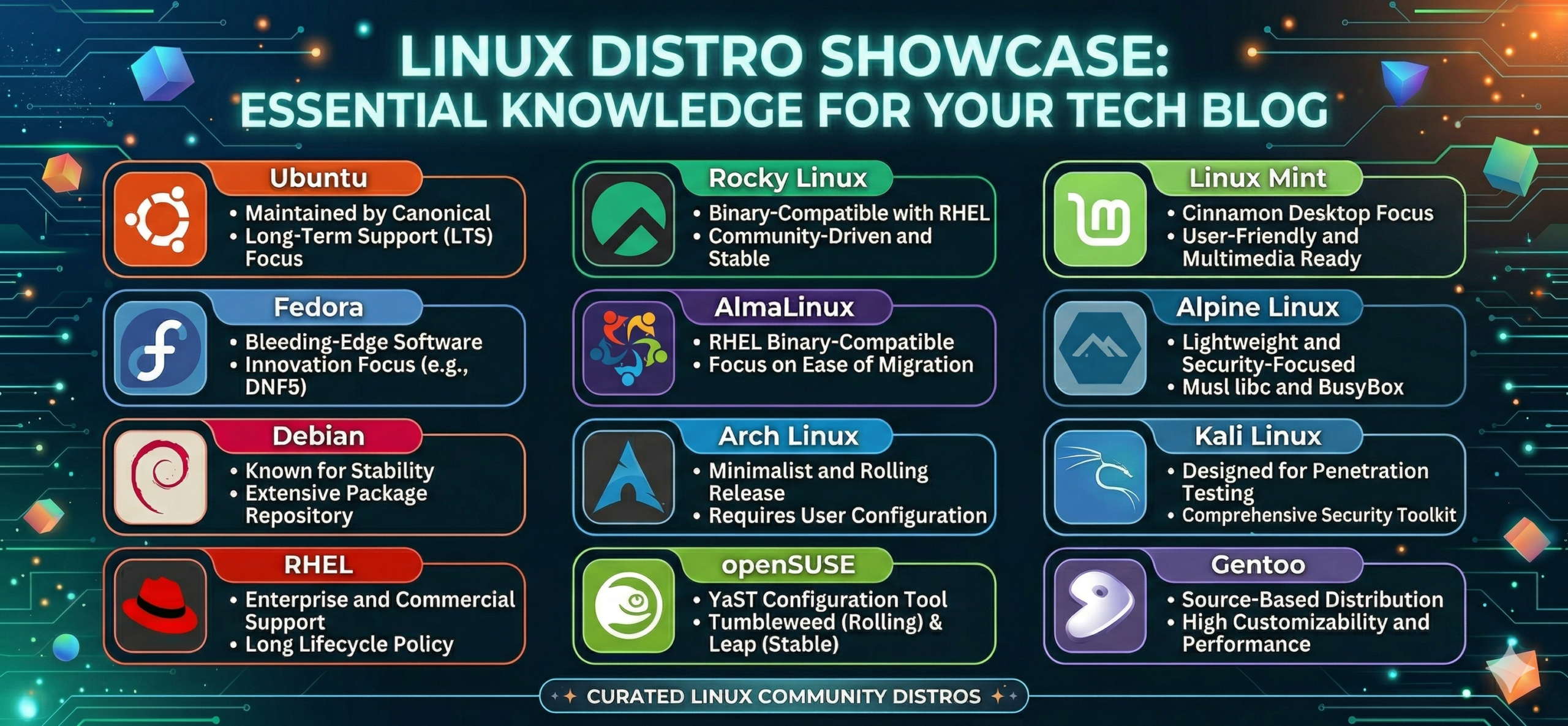
Those choices create meaningful differences. Debian, for example, is conservative by design and values stability. Fedora adopts new technologies much faster and often acts as a proving ground for changes that later appear elsewhere. Ubuntu tries to balance accessibility with broad practical usefulness. Arch strips the system down and hands more responsibility to the user. Alpine keeps things small and security-oriented, which is why it became so common in containers. None of these approaches is universally “best.” Each one is best in a specific context.
Which One Should You Learn First?
For beginners and general use
If you are brand new to Linux, Ubuntu and Linux Mint still make the most sense for most people. They reduce setup pain, document common tasks well, and let new users spend time learning Linux itself instead of wrestling with installation details or avoidable friction. Mint pushes even further toward a familiar desktop experience, while Ubuntu gives you a broader bridge into cloud, server, and general Linux usage.
If you already know the basics and want a more current system, Fedora is a strong next step. It moves faster than Ubuntu or Debian, ships modern components earlier, and stays close to a technically serious upstream culture. Users who want a polished desktop but still care about what is happening in the modern Linux stack often end up there. Fedora 41’s switch to DNF5 as the default is a good example of that willingness to move earlier on platform changes.
If stability matters more than novelty, Debian still deserves respect. It remains one of the foundational Linux distributions, and its stable branch continues to set the tone for a huge part of the ecosystem. Debian 13 “trixie” is the current stable release, and Debian’s long-standing reputation for predictability remains the main reason people trust it for calm, dependable systems.
For RHEL-style systems
If you want to understand the RHEL-style world without centering everything around Red Hat subscriptions, Rocky Linux and AlmaLinux are the obvious names to know. Rocky describes itself as 100% bug-for-bug compatible with RHEL, while AlmaLinux positions itself as a stable, secure distribution compatible with RHEL and centered on ABI compatibility. Those distinctions matter less to beginners than to users trying to understand how the enterprise-oriented branch of Linux evolved after classic CentOS.
For containers, security, and deeper learning
If your interest is containers, minimal systems, or lightweight deployments, Alpine Linux matters far more than its small footprint suggests. Alpine describes itself as security-oriented and lightweight, based on musl libc and BusyBox, and it continues to publish stable branches on a predictable cadence. That is not just trivia; it is the reason Alpine became such a common base in container workflows.
If your interest is security testing, Kali Linux becomes relevant, but only once the basics are in place. Kali is explicitly geared toward penetration testing, security research, computer forensics, and reverse engineering. It is not a general beginner distro, and it does not become a good beginner distro just because it looks specialized.
If you want to understand Linux more deeply, Arch Linux and Gentoo remain the two classic “earn your understanding” paths. Arch is lightweight, flexible, and intentionally simple in design, while Gentoo still represents the source-based, highly customizable end of the spectrum. Arch is far more commonly discussed today, but Gentoo still matters as a model of deep control and hands-on learning.
Ubuntu
Ubuntu remains the most broadly recommendable Linux distribution because it gets the balance right more often than most alternatives. It is accessible enough for beginners, but it does not trap users in a beginner-only corner. Someone can start on Ubuntu, learn the command line, experiment with packages, run local containers, manage services, or deploy a server without immediately hitting an artificial wall.
That range matters. Many distributions are either easier but narrower, or more powerful but needlessly hostile to less experienced users. Ubuntu has always occupied the middle ground well. Canonical’s release cycle also makes Ubuntu easier to reason about than many faster-moving distributions. Regular releases happen on a fixed cadence, and Long Term Support releases provide the longer window that many users prefer. Canonical’s Ubuntu Pro materials now describe up to 15 years of security coverage when Pro and the Legacy add-on are included, which reinforces Ubuntu’s role as a long-lived platform rather than just a casual desktop choice.
Ubuntu also matters because it is visible everywhere. It appears in cloud marketplaces, development workflows, tutorials, home labs, VPS setups, and general Linux education. That visibility can make it seem boring to people who confuse novelty with value, but boring in this case often means well-supported, widely understood, and easy to work with. That is not a weakness.
Fedora
Fedora occupies a very useful place in the Linux world because it gives users a modern system without turning everything into a manual exercise. It tends to adopt new kernels, desktop components, and platform tooling earlier than conservative distributions, but it still presents itself as a coherent product rather than a hobbyist obstacle course.
That is why Fedora keeps attracting users who want a modern workstation. It feels current without becoming chaotic. It also has real cultural weight in Linux because many users see it as a technically serious environment where new ideas get tested in public before broader adoption. The move to DNF5 as the default in Fedora 41 fits that pattern exactly: Fedora is often willing to make forward-looking transitions sooner than more stability-focused distributions.
Fedora is rarely the first distro a nervous beginner should install, but it is often the first distro that makes a user feel they have moved past the most beginner-oriented stage. It rewards curiosity, but it does not force every lesson to be painful.
Debian
Debian has one of the clearest identities in Linux. It values stability, caution, and a disciplined release model, and it has been doing that for so long that much of the ecosystem now takes Debian’s existence for granted. That would be a mistake. A huge amount of Linux derives strength from Debian’s approach, not just from its packages but from its standards, tools, and habits.
The current stable release is Debian 13 “trixie,” initially released on August 9, 2025, with point releases continuing afterward. That matters because Debian stable is never just “latest Debian.” It is a branch users choose specifically because they want something vetted and dependable. Debian does not promise excitement; it promises that the machine is less likely to surprise you in stupid ways.
Debian’s biggest strength is not raw convenience. It is trust. When people describe Debian as boring, they usually mean that it does not lurch around with every new fashion in desktop or package tooling. That restraint is precisely why it remains one of the most respected Linux distributions in existence.
Red Hat Enterprise Linux (RHEL)
Red Hat Enterprise Linux matters even to users who never install it directly. It defines a huge amount of what people mean when they talk about enterprise Linux: long support lifecycles, predictable maintenance, security guidance, standardized workflows, and a strong focus on operational consistency.
Red Hat’s own lifecycle documentation states that RHEL 8, 9, and 10 each deliver a ten-year lifecycle across Full Support and Maintenance Support phases before Extended Life Phase. That kind of horizon influences how organizations plan, but it also shapes how adjacent distributions position themselves. Rocky Linux and AlmaLinux both make sense partly because RHEL created a world in which that model matters.
RHEL is not the distro most people install for fun. It is important because it sits near the center of one major branch of the Linux family tree. If you do not understand why RHEL exists or why its ecosystem matters, a large piece of the Linux landscape stays blurry.
Rocky Linux and AlmaLinux
Rocky Linux and AlmaLinux deserve to be discussed together because both became much more important after the old CentOS model changed. They are not identical in governance or messaging, but in practical terms they answer the same broad need: they give users a way to work inside a RHEL-aligned ecosystem without making Red Hat’s commercial structure the center of the experience.
Rocky Linux presents itself in very direct terms: an open-source enterprise operating system designed to be 100% bug-for-bug compatible with RHEL. That wording matters because it signals a very specific ambition. Rocky wants users to treat it as a close, predictable stand-in for that ecosystem. AlmaLinux took a somewhat different route after 2023, emphasizing ABI compatibility and practical software compatibility for applications built to run on RHEL. AlmaLinux’s own FAQ still describes it as community-owned, stable, secure, and compatible with RHEL. In practice, that makes AlmaLinux less about copying every internal detail and more about preserving what most users and workloads actually need.
Both projects matter because they kept the RHEL-adjacent world accessible. Without them, the post-CentOS conversation would have narrowed dramatically.
What Happened to CentOS?
CentOS used to be the easy answer for users who wanted a free platform closely aligned with RHEL. That older advice now causes more confusion than clarity.
The key problem is that many tutorials, old blog posts, and stale recommendations still speak about CentOS as if the classic model never changed. It did. CentOS Stream remains active, but it sits in a different place in the ecosystem and no longer fills the exact role classic CentOS once filled for users who wanted a very conservative downstream experience. That shift is the whole reason Rocky Linux and AlmaLinux became so prominent in the first place. The current Linux landscape makes more sense when you stop trying to fit today’s projects into yesterday’s CentOS assumptions.
Arch Linux
Arch Linux remains important because it represents one of the clearest alternative philosophies in Linux: keep the system lean, keep the design simple, and expect the user to understand what they are doing. Arch’s official site still describes it as a lightweight and flexible distribution that tries to “Keep It Simple,” and its documentation remains one of the reasons it has such a strong reputation.
What makes Arch attractive is not just that it is rolling release. Plenty of systems update often. The real appeal is that Arch keeps the user close to the machine. It does not hide the structure of the system behind as many layers of automation or packaging decisions. That is why people often say Arch taught them Linux more effectively than an easier distro did. The pain is not the point, but the visibility is.
That said, Arch is easy to romanticize. Many users do not actually need that level of involvement. A distro can be educational and still be a bad fit for someone who simply needs a reliable machine and would rather spend their time elsewhere.
openSUSE
openSUSE is one of the strongest distributions people forget to mention. That is not because it lacks quality. It is because it sits outside some of the louder online tribal camps that dominate Linux discussions.
Its official messaging is broad and practical: openSUSE makes Linux operating systems for desktops, servers, and containers. That range matters, but the project’s real distinction is that it combines serious tooling with multiple release styles. Users can choose a more stable path, a rolling path such as Tumbleweed, or newer variants exposed through the broader openSUSE family. The official distribution portal currently points users toward Tumbleweed, Leap 16.0, Leap 16.1 Alpha, Leap Micro, and MicroOS.
openSUSE is worth taking seriously because it often solves the “serious but not joyless” problem well. It gives users capable administration tools, a strong technical base, and flexible options without requiring the cultural baggage that sometimes comes with other distros.
Linux Mint
Linux Mint still matters because most people do not start Linux as hobbyist purists. They start because they want a system they can use. Mint understands that better than many distributions do.
The project continues to position itself around comfort, familiarity, and refinement. Linux Mint 22.3 “Zena” is a current long-term support release supported until April 2029, and that alone tells you something about its posture: Mint is not trying to overwhelm users with reinvention every few months. It is trying to give them a desktop they can live with.
For users coming from Windows, that matters a lot. Mint lowers the cognitive shock. It does not insist that the first Linux experience must also be a philosophical rite of passage. That makes it easy to underestimate, but ease of adoption is a real strength, not a flaw.
Alpine Linux
Alpine Linux matters disproportionately to its size. It became important because it solves a very specific problem very well: it keeps systems small, simple, and security-oriented. Alpine’s official description still centers on that identity, highlighting musl libc, BusyBox, and its lightweight design. Stable release branches continue on a regular cycle, with the project documenting branch support windows clearly.
That design made Alpine a natural fit for containers. Small base images reduce overhead, speed up pulls, and limit the amount of baggage inside the image. The tradeoff, of course, is compatibility and behavior: Alpine is not just “Ubuntu but smaller.” Its libc choice and minimalism affect how software behaves and how users troubleshoot issues. That is precisely why it deserves study rather than just casual name recognition.
If you work with Docker and still think Alpine is only a tiny distro with a cool reputation, you are missing the reason it became so widespread.
Kali Linux
Kali Linux is one of the most widely recognized distributions outside the Linux world, but a lot of that recognition is shallow. People know the name before they know the purpose.
Kali’s official site is clear about what it is: a Debian-based distribution geared toward penetration testing, security research, computer forensics, and reverse engineering. It exists to put a security-focused toolkit in one place, not to function as the ideal all-purpose Linux desktop for newcomers. Kali’s documentation also explicitly instructs users to download official images only through the official page, which tells you something about the project’s operational seriousness.
The mistake beginners make is not using Kali. The mistake is using Kali for the wrong reason. A specialized toolkit does not replace Linux fundamentals. Without those fundamentals, Kali often becomes a costume rather than a platform.
Gentoo
Gentoo still sits at the far end of the “deep control” spectrum. Even though the distribution does not dominate mainstream Linux discussion the way Ubuntu or Fedora do, it continues to matter because it represents a fundamentally different model of ownership over the system. The package ecosystem remains active, and the project still offers a clear home for users who want extremely fine-grained control.
What Gentoo teaches is not just package compilation. It teaches patience, dependency awareness, system design, and the consequences of your own choices. That is educational in a way many easier distributions are not. It is also time-consuming in a way many easier distributions wisely avoid.
Gentoo is not outdated. It is specialized. That distinction matters.
Which Linux Distribution Should You Start With?
If you want the smoothest entry into Linux, start with Ubuntu or Linux Mint. Both reduce friction, both have strong communities, and both let you start learning without forcing every lesson through unnecessary setup pain. If you want a more current and polished system, try Fedora. It gives you more exposure to modern tooling and faster platform changes while still keeping the user experience coherent. If stability matters most, choose Debian. It remains one of the best answers for users who value predictability over novelty.
If you want to explore the RHEL-aligned ecosystem, Rocky Linux and AlmaLinux are the names to know, for containers are your main interest, learn Alpine. On the other hand security work is your reason for being here, build the basics first and then move into Kali with intent. If deep hands-on understanding matters more than convenience, look at Arch or Gentoo.
Final Thoughts
The best Linux distributions are not the ones that win the loudest arguments. They are the ones that solve the right problem for the right user.
Ubuntu still wins on breadth and practicality. Fedora remains one of the best modern all-round technical desktops. Debian keeps earning trust through stability. RHEL continues to matter because it anchors an entire ecosystem. Rocky Linux and AlmaLinux matter because they kept that ecosystem accessible. Linux Mint makes Linux easier to approach. Alpine dominates an important niche by staying small and efficient. Kali stays relevant by doing one specialized job well. Arch and Gentoo continue to matter because they teach users what lies underneath the convenience layers.
Once you stop looking for one universal winner and start looking for fit, the Linux landscape becomes much easier to understand.
References and Official Links
- Ubuntu official site and release support information
- Fedora official project and DNF5 change documentation
- Debian official releases and Debian 13 trixie release information
- Red Hat Enterprise Linux overview and lifecycle policy
- Rocky Linux official site and project information
- AlmaLinux official site and FAQ compatibility explanation and download resources
- Arch Linux official site and about page and installation guide
- openSUSE official site and distribution portal
- Linux Mint official site and release notes
- Alpine Linux official site and about page and release branch documentation
- Kali Linux official site and download guidance and release history
- Gentoo project ecosystem entry point and packages