
Most Azure environments do not start with a network design. They start with a virtual network, then another, then a third spun up by a different team for a different project. Six months later you have a dozen VNets, three copies of the same DNS forwarder, no consistent way to inspect outbound traffic, and no single place to terminate the VPN back to the data centre. The Azure hub-and-spoke network topology exists to prevent exactly that outcome — and to fix it where it has already happened.
This guide covers what the topology is, the components that make it work, how traffic actually flows through it, how it compares to Azure Virtual WAN, what it costs, the design mistakes that are expensive to undo, and how to validate the design once it is in place. It is written for engineers and architects who have to make — and defend — a networking decision for a real environment.
What Is the Hub-and-Spoke Topology?
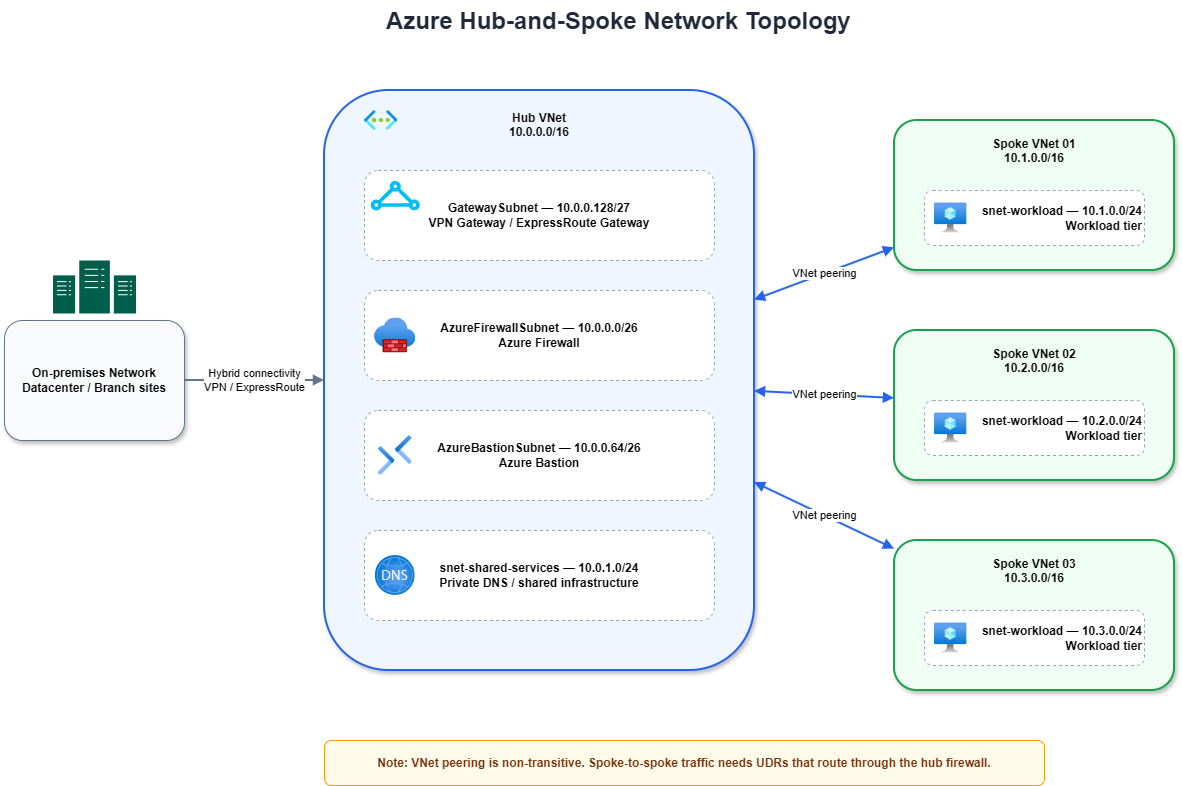
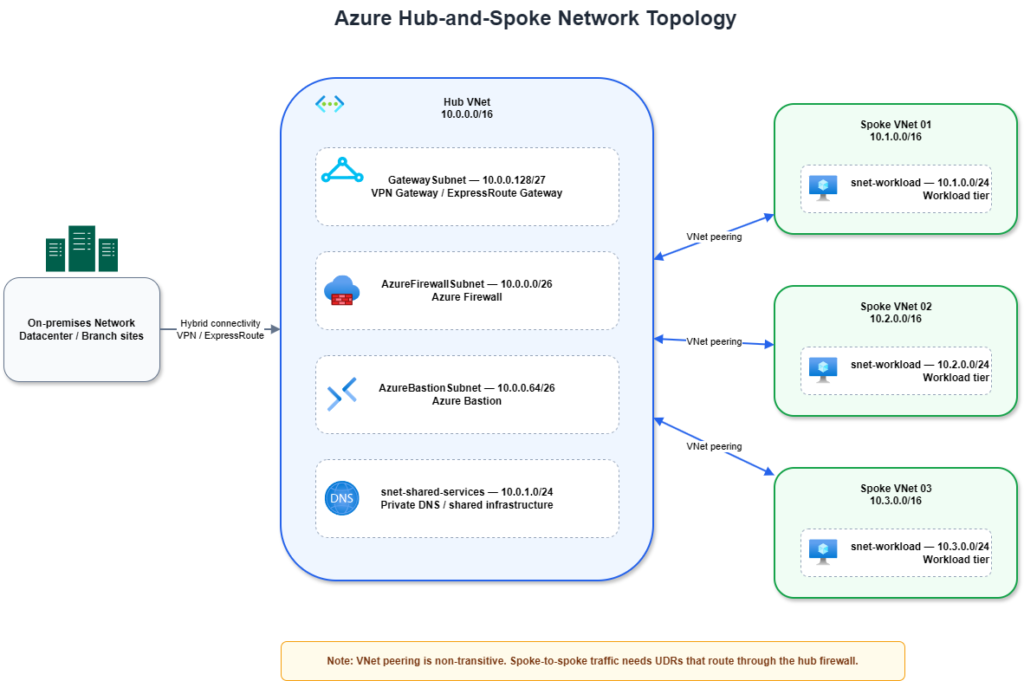
Hub-and-spoke is a network architecture in which a single central virtual network — the hub — hosts services that every workload needs, while individual workloads live in their own isolated virtual networks — the spokes. Each spoke connects to the hub through a VNet peering. Spokes do not connect to each other directly. Shared concerns such as on-premises connectivity, traffic inspection, and management access are centralised in the hub and consumed by every spoke.
The value of the pattern is consolidation. Connectivity to on-premises is built and paid for once, in the hub, instead of once per workload. Outbound traffic is inspected at one chokepoint instead of a dozen. Workloads stay isolated from each other by default, which is a security property you get for free rather than one you have to engineer. And the design scales predictably: adding a workload means adding a spoke and a peering, not redesigning the network.
Architecture Decision Summary
The table below condenses the decisions that shape every hub-and-spoke deployment. The rest of the article explains the reasoning; use this as a quick reference for design reviews.
| Decision | Strong default | Change it when |
| Hub model | One hub VNet per primary region | You operate many regions or many branch sites |
| Spoke model | One spoke per workload or environment | A workload tier requires its own strict internal isolation |
| Spoke-to-spoke traffic | Block by default; inspect through the hub firewall | Low-risk internal flows justify direct peering |
| Egress to internet | Route outbound through Azure Firewall or an NVA in the hub | The workload has no inspection or compliance requirement |
| Hybrid connectivity | Terminate VPN or ExpressRoute in the hub | A spoke has independent connectivity requirements |
| DNS | Centralise Private DNS resolution in the hub | A spoke is intentionally isolated |
| Operating model | Classic hub-and-spoke | A multi-region or multi-branch estate suggests Virtual WAN instead |
Core Components of a Hub-and-Spoke Network
A hub-and-spoke deployment is an assembly of standard Azure networking resources. What makes it an architecture rather than a pile of VNets is how those resources are placed and connected.
The hub VNet
The hub is a virtual network whose only job is to host shared services. It typically contains several dedicated subnets, each with a specific purpose: AzureFirewallSubnet for Azure Firewall, GatewaySubnet for the VPN or ExpressRoute gateway, AzureBastionSubnet for Azure Bastion, and one or more subnets for shared infrastructure such as DNS forwarders or domain controllers. Two of those subnet names — AzureFirewallSubnet and GatewaySubnet — are reserved and mandatory; Azure will not place the corresponding service anywhere else.
Subnet sizing in the hub is a decision you make once and live with for the lifetime of the environment, so size with headroom. AzureFirewallSubnet requires a /26 minimum. AzureBastionSubnet requires a /26 minimum. GatewaySubnet should be sized generously: for production hubs, use /26 unless you have a very specific reason not to. Smaller ranges may work for simple deployments, but they leave little room for future gateway scale, ExpressRoute scenarios, or long-term growth.
Spoke VNets
A spoke is a virtual network that hosts one workload, or one workload tier, or one environment. The isolation boundary is deliberate: a compromise in one spoke does not give an attacker a path into another. Spokes should not host shared services — that is the hub’s job. Keeping spokes thin keeps the design predictable.
VNet peering
VNet peering is the connective tissue. It links two virtual networks so that resources in each can reach the other over the Azure backbone, with no gateway and no public internet in the path. In a hub-and-spoke design you create one peering pair per spoke: hub-to-spoke and spoke-to-hub.
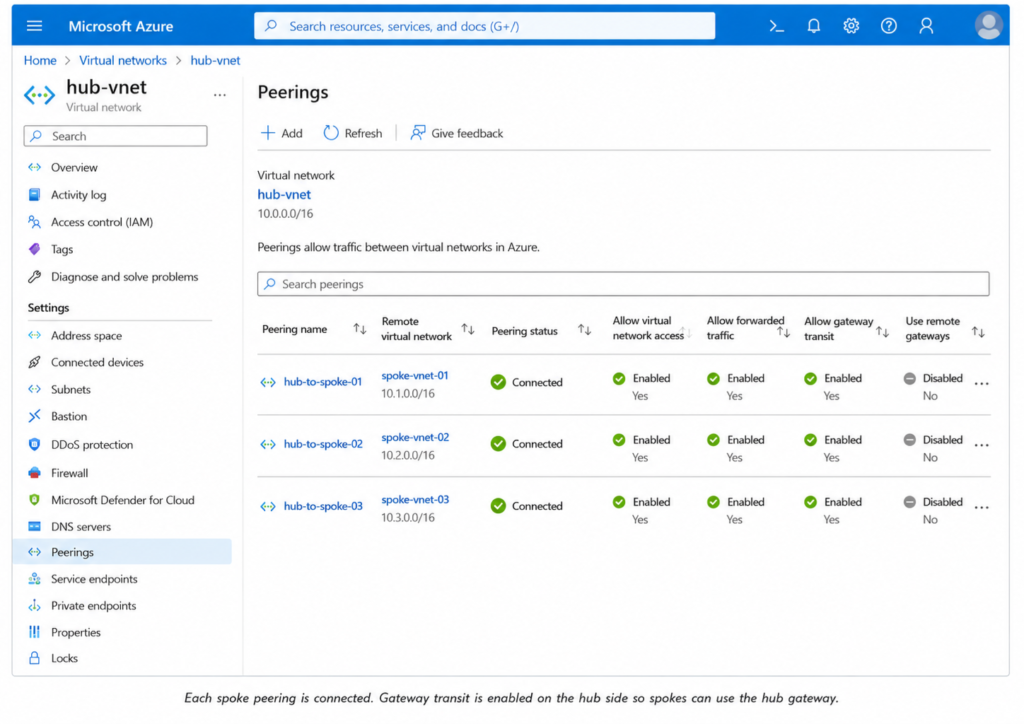
Two peering settings carry most of the design weight. Allow forwarded traffic permits packets that did not originate inside the peered VNet to cross the peering — but it does not create transit by itself. You still need explicit user-defined routes and a forwarding device, such as Azure Firewall or an NVA, in the hub. Enabling the checkbox without the routing and the appliance produces a configuration that looks right and does nothing. Gateway transit (allowGatewayTransit on the hub side, useRemoteGateways on the spoke side) lets spokes use the hub’s VPN or ExpressRoute gateway instead of each deploying their own.
Connectivity gateways
Hybrid connectivity lives in the hub. A VPN Gateway terminates encrypted site-to-site or point-to-site tunnels over the internet. An ExpressRoute Gateway terminates a private circuit that never touches the public internet, which is the preferred option for latency-sensitive workloads and regulated data. Many enterprises deploy both — ExpressRoute as the primary path, VPN as failover — and rely on BGP to steer traffic.
Because of gateway transit, every spoke reaches on-premises through the hub’s gateway. One important constraint: a spoke can use the remote gateway of only one peered VNet. That single rule shapes how multi-hub designs have to be drawn.
Azure Firewall or a network virtual appliance
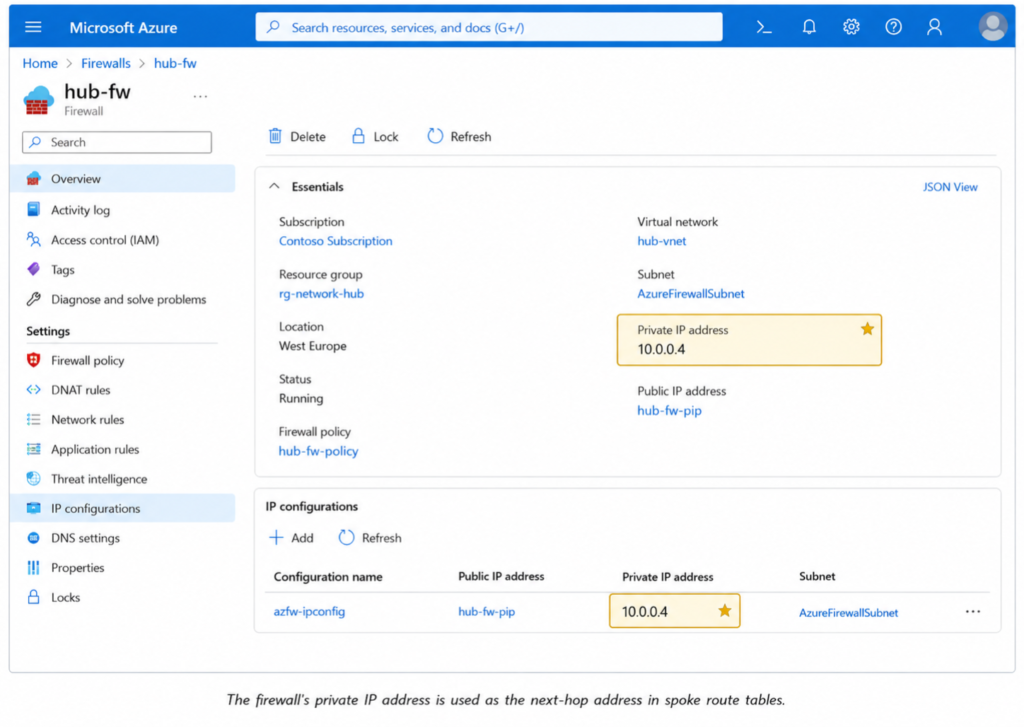
The hub is where you inspect traffic. Azure Firewall is the managed, first-party option: stateful, highly available, and auto-scaling, with no infrastructure for you to patch. Alternatively, a partner network virtual appliance (NVA) — a third-party firewall from a vendor you already standardise on — can sit in the same position. Either way, the firewall in the hub becomes the next hop for traffic that needs inspection.
Azure Bastion
Azure Bastion provides RDP and SSH access to VMs through the Azure portal over TLS, with no public IP on the VMs and no jump box to maintain. Placed in the hub, a single Bastion deployment can provide centralised management access to VMs in peered spokes, assuming the required peering, routing, and network reachability are in place. This removes a recurring source of exposed management ports across the estate.
Private DNS
DNS is the component teams underestimate most. The moment you adopt Azure Private Endpoints, name resolution has to direct traffic to private IP addresses instead of public ones. The standard pattern centralises this in the hub: Azure Private DNS zones, or a set of DNS forwarder VMs, linked so that every spoke resolves names consistently. Get DNS wrong and private connectivity silently breaks in ways that are tedious to diagnose.
How Traffic Flows Through Hub-and-Spoke
Understanding the topology means understanding two distinct traffic patterns. They behave differently, and the difference is the single most important thing to internalise about this architecture.
North-south traffic
North-south is traffic between the environment and the outside world — on-premises networks and the public internet. It flows naturally through the hub because that is where the gateways and the firewall live. A spoke VM reaching an on-premises database sends traffic across its peering into the hub, through the firewall, out the ExpressRoute or VPN gateway, and on-premises. Return traffic retraces the path. Outbound internet traffic follows the same route through the firewall, which is what gives you a single, auditable egress point.
East-west traffic and non-transitive peering
East-west is traffic between spokes — Spoke A talking to Spoke B. Here is the rule that defines the architecture: VNet peering is not transitive. If Spoke A is peered to the hub and Spoke B is peered to the hub, that does not mean Spoke A can reach Spoke B. The hub does not relay between them automatically.
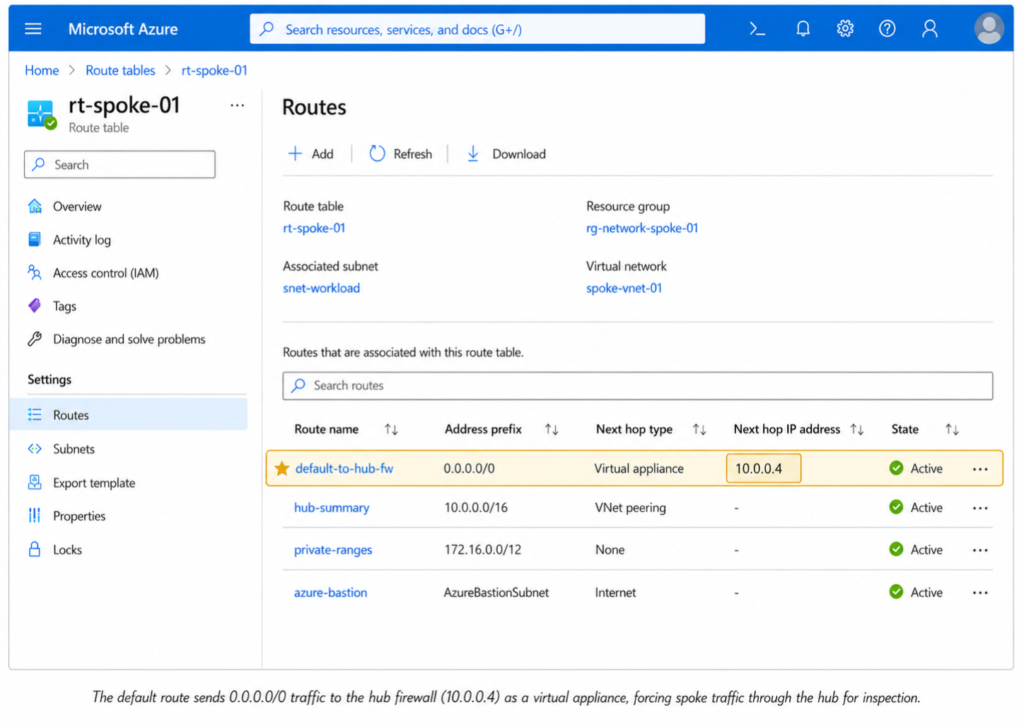
To make spoke-to-spoke traffic work, you create user-defined routes (UDRs) in a route table associated with the spoke’s subnet. The route says: to reach Spoke B’s address range, send the packet to the hub firewall’s private IP as the next hop. The firewall then forwards it on. You configure this in both directions, and you allow the flow in the firewall’s rules.
Direct spoke-to-spoke peering is technically possible, and Azure Virtual Network Manager can place spokes into a connected network group that mesh-peers them automatically. Both options weaken the central-control model and become hard to govern as the number of spokes grows. In a security-driven hub-and-spoke design, inspected spoke-to-spoke traffic is routed through Azure Firewall or an NVA in the hub. Reserve direct peering for the rare flow whose business value clearly outweighs the loss of central inspection.
This is simultaneously the greatest strength and the greatest operational cost of hub-and-spoke. Every spoke-to-spoke flow is explicit. Nothing communicates unless you have deliberately allowed it — excellent for security and segmentation. But you own every route table and every firewall rule, and that administrative weight grows with every spoke you add.
Hub-and-Spoke vs Azure Virtual WAN
A guide written in 2026 that ignores Azure Virtual WAN is incomplete. Virtual WAN (vWAN) is Microsoft’s managed alternative, and choosing between the two is one of the harder-to-reverse decisions in an Azure landing zone.
The classic hub-and-spoke described above is self-managed: you build the hub VNet, you deploy the gateways, you write the route tables, you own the routing. Azure Virtual WAN replaces that self-managed hub with a Microsoft-managed virtual hub. You do not create a hub VNet — you create a Virtual WAN resource and deploy a virtual hub per region. Spokes connect to the virtual hub through VNet connections rather than classic peerings.
The defining technical difference: Virtual WAN provides transitive routing by default. Spoke-to-spoke traffic just works, with no UDRs to write and maintain. A secured virtual hub also folds in Azure Firewall management and built-in routing intent, removing much of the route-table burden entirely. Virtual WAN additionally shines for organisations with many branch offices, because it automates VPN tunnel provisioning from SD-WAN devices.
When to choose classic hub-and-spoke
Choose classic hub-and-spoke when you operate in one or a few regions, you want complete and explicit control over every traffic flow, your team has the networking depth to own routing, and predictable granular control matters more than reduced operations.
When to choose Virtual WAN
Choose Virtual WAN when you have a large or growing geographic footprint, many branches or regions that need any-to-any connectivity, or a team that would rather consume managed routing than build it. The trade-off is less granular control and a different — often, for large estates, lower — cost structure.
Neither is universally correct. The honest framing: classic hub-and-spoke optimises for control, Virtual WAN optimises for scale and reduced operational overhead. Decide based on your footprint and your team, not on which is newer. For multi-tenant estates, this decision interacts with broader governance choices — see our guide on managing multiple Azure tenants for enterprise cloud environments.
Design Considerations and Common Pitfalls
The mistakes below are the ones that are cheap to avoid up front and expensive to fix once workloads are live.
IP address planning
Every VNet in the topology must have a non-overlapping address space — overlapping ranges cannot be peered, full stop. Plan the whole address plan before you deploy the first VNet, and allocate generous, contiguous blocks per spoke with room to grow. Re-addressing a live VNet is one of the most painful operations in Azure.
Non-transitive peering
Teams repeatedly assume that two spokes peered to the same hub can talk to each other. They cannot, without UDRs. Build this assumption into your design reviews so it never becomes a production surprise.
The single-gateway-transit limit
A spoke can use the remote gateway of only one peered VNet. This constrains multi-hub designs and has to be accounted for on the whiteboard, not discovered later.
DNS strategy
Decide centralised DNS resolution before you adopt Private Endpoints, not after. Retrofitting DNS across a populated environment is slow and error-prone.
Single region versus multi-region
A single hub serves a single region well. Multi-region resilience means a hub per region plus hub-to-hub connectivity — and at that point the operational case for Virtual WAN gets noticeably stronger.
Scale ceilings
Classic hub-and-spoke has explicit scale limits worth knowing. By default, a VNet can be peered with up to 500 other VNets; Azure Virtual Network Manager can raise this to 1,000 in supported connectivity configurations. A route table supports up to 400 user-defined routes by default, with higher limits available through Azure Virtual Network Manager routing configuration. These ceilings are generous for most organisations, but if every spoke requires explicit routes to every other spoke, the model becomes operationally heavy long before it becomes technically impossible. At that point you are no longer designing hub-and-spoke; you are reinventing Virtual WAN by hand.
Deploying a Hub-and-Spoke with Bicep
A topology this regular should never be click-deployed. Infrastructure as Code makes it repeatable, reviewable, and consistent across environments. The skeleton below shows the core resources — a hub VNet, a spoke VNet, and the peering pair. If Bicep is new to you, start with our introduction to Azure Bicep for Infrastructure as Code.
// hub-spoke.bicep — minimal hub-and-spoke skeleton
param location string = resourceGroup().location

resource hubVnet 'Microsoft.Network/virtualNetworks@2024-05-01' = {
  name: 'vnet-hub'
  location: location
  properties: {
    addressSpace: { addressPrefixes: [ '10.0.0.0/16' ] }
    subnets: [
      { name: 'AzureFirewallSubnet', properties: { addressPrefix: '10.0.0.0/26' } }
      { name: 'AzureBastionSubnet',  properties: { addressPrefix: '10.0.0.64/26' } }
      { name: 'GatewaySubnet',       properties: { addressPrefix: '10.0.0.128/26' } }
    ]
  }
}

resource spokeVnet 'Microsoft.Network/virtualNetworks@2024-05-01' = {
  name: 'vnet-spoke-01'
  location: location
  properties: {
    addressSpace: { addressPrefixes: [ '10.1.0.0/16' ] }
    subnets: [
      { name: 'snet-workload', properties: { addressPrefix: '10.1.0.0/24' } }
    ]
  }
}

resource hubToSpoke 'Microsoft.Network/virtualNetworks/virtualNetworkPeerings@2024-05-01' = {
  parent: hubVnet
  name: 'peer-hub-to-spoke01'
  properties: {
    remoteVirtualNetwork: { id: spokeVnet.id }
    allowVirtualNetworkAccess: true
    allowForwardedTraffic: true
    allowGatewayTransit: true
  }
}

resource spokeToHub 'Microsoft.Network/virtualNetworks/virtualNetworkPeerings@2024-05-01' = {
  parent: spokeVnet
  name: 'peer-spoke01-to-hub'
  properties: {
    remoteVirtualNetwork: { id: hubVnet.id }
    allowVirtualNetworkAccess: true
    allowForwardedTraffic: true
    useRemoteGateways: false   // set to true once a gateway exists in the hub
  }
}In practice you would parameterise the address spaces, turn the spoke into a reusable module, and loop over it to deploy many spokes from one definition — which is exactly where Infrastructure as Code earns its place in this pattern.
Cost Considerations
Hub-and-spoke has no licensing fee — you pay for the resources it is built from. Three line items dominate.
VNet peering is billed per gigabyte of data transferred, in both the inbound and outbound directions. The per-VNet, per-subnet, and per-peering objects themselves carry no standing charge, which is why a lab made only of VNets and peerings costs effectively nothing to leave running.
The gateway — VPN or ExpressRoute — is a continuous hourly charge, plus, for ExpressRoute, the circuit cost from your connectivity provider.
Azure Firewall is usually the largest line item. It bills a fixed fee per deployment hour plus a per-gigabyte data processing charge, and partial hours are billed as full hours. As a rough guide at the time of writing, the Standard tier runs on the order of roughly 1.25 USD per deployment hour, with Basic lower and Premium higher; data processing is charged on top. Treat those figures as indicative only — pricing varies by region and changes over time, so confirm against the official Azure Firewall pricing page before you commit a budget.
The practical takeaway for anyone building a lab: VNets and peerings are essentially free to keep, but the firewall and gateways bill by the hour. Deploy them when you need them — including for capturing screenshots — and delete them the same hour.
How to Validate the Design
Building the topology is only half the work. The other half is proving it behaves as intended. Run the following operational checks before any workload trusts the network.
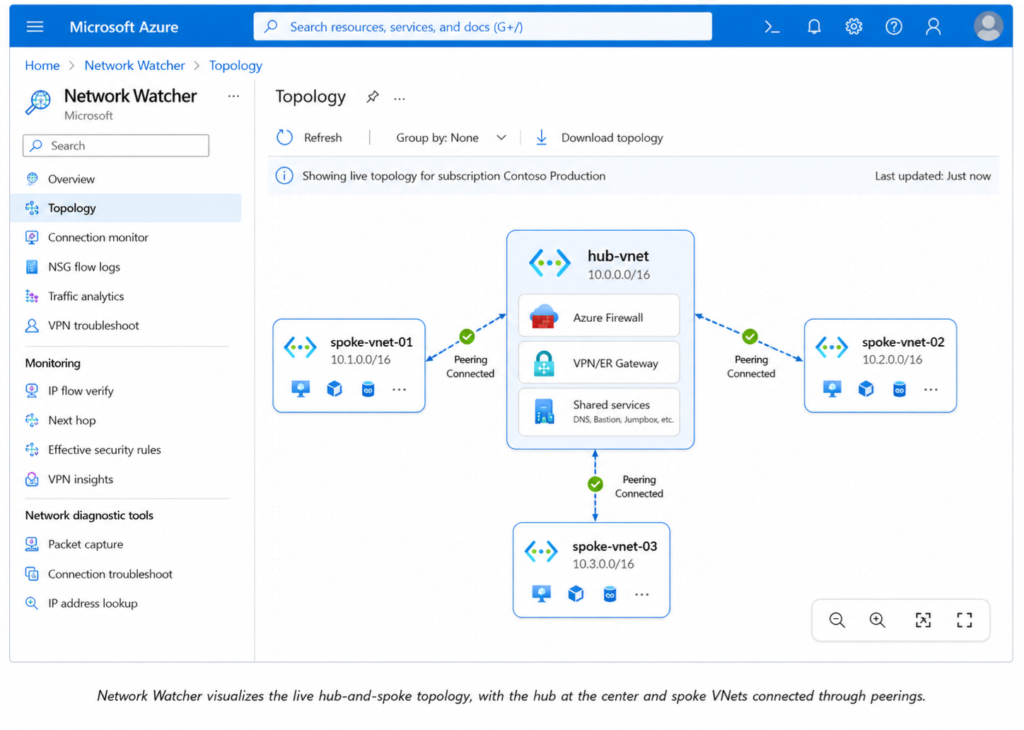
- Confirm every VNet peering reports Connected status, with Allow forwarded traffic and the gateway-transit settings configured correctly on each side.
- Check effective routes on a NIC in each spoke. The default route should point to the hub firewall’s private IP wherever forced egress applies.
- Use Network Watcher Connection Troubleshoot from a spoke VM to an on-premises target and to another spoke. Confirm the path traverses the hub firewall, not a direct peer.
- Verify the firewall logs show the expected flows and rule hits. If a flow you expect to see is missing, a routing assumption is wrong.
- Test DNS resolution for a Private Endpoint from every spoke. Wrong DNS is the most common silent failure in this pattern.
- Run a connectivity check from on-premises into a spoke. Gateway transit, route propagation, and firewall rules all have to align — a single missing setting breaks the chain quietly.
When NOT to Use Hub-and-Spoke
Hub-and-spoke is a strong default, not a universal one. A single small workload with no on-premises connectivity and no need for centralised inspection does not need a hub — a single well-designed VNet is simpler and cheaper, and simplicity is a feature. Short-lived dev or test environments rarely justify the hub’s overhead. And once your footprint spans many regions and branches with any-to-any connectivity requirements, the managed routing of Virtual WAN often becomes the better engineering choice. Reach for hub-and-spoke when you have multiple workloads, a real need for shared services, and a requirement to inspect and control traffic centrally — not reflexively.
Frequently Asked Questions
Is VNet peering transitive in Azure? No. VNet peering is non-transitive. If two spoke VNets are both peered to a hub, they still cannot communicate with each other directly. Spoke-to-spoke traffic requires user-defined routes that send traffic through a network appliance — typically a firewall — in the hub.
Can spokes communicate with each other in a hub-and-spoke topology? Yes, but not automatically. You enable spoke-to-spoke communication by adding user-defined routes to the spoke subnets that set the hub firewall’s private IP as the next hop, and by allowing the traffic in the firewall’s rules. Without that configuration, spokes remain isolated.
Should I use hub-and-spoke or Azure Virtual WAN? Use classic hub-and-spoke for full, explicit control in one or a few regions when your team can own the routing. Use Virtual WAN for large multi-region or multi-branch estates that need any-to-any connectivity with less operational overhead. Virtual WAN provides transitive routing by default; classic hub-and-spoke does not.
How much does a hub-and-spoke network cost in Azure? There is no licence cost. You pay for the underlying resources: per-gigabyte VNet peering data transfer, the hourly cost of any VPN or ExpressRoute gateway, and Azure Firewall (a fixed hourly fee plus per-gigabyte data processing). VNets, subnets, and peerings themselves carry no standing charge.
Do I need Azure Firewall in the hub? Not strictly. Azure Firewall is the common choice for centralised traffic inspection, but you can use a third-party network virtual appliance instead, or omit the firewall entirely if you do not require centralised inspection. The firewall is what enables a single audited point for spoke-to-spoke and outbound traffic.
Conclusion
The Azure hub-and-spoke network topology endures because it solves a real problem cleanly: it consolidates shared services, centralises connectivity and inspection, and keeps workloads isolated by default — all while scaling one predictable spoke at a time. Its defining trait, non-transitive peering, is both its security strength and its operational cost: nothing talks unless you have explicitly allowed it. Master that single idea, plan your address space with headroom, decide DNS early, validate every flow you depend on, and weigh the topology honestly against Virtual WAN for your footprint, and you have a network foundation that will hold up for years.