
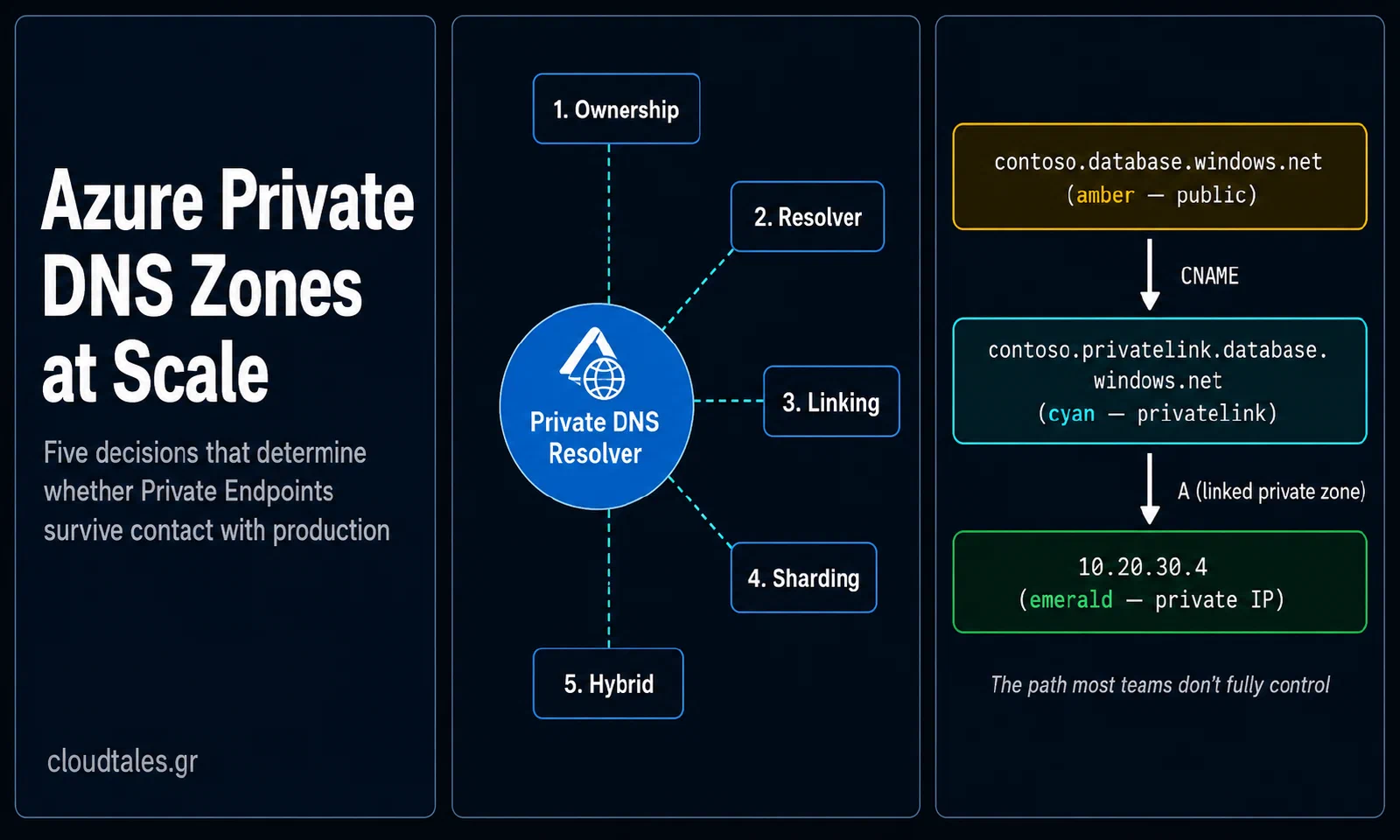
Most Azure Private DNS strategies don’t survive contact with Private Endpoints at scale. The pattern looks clean in a proof of concept. Create a privatelink zone, link the virtual network, deploy the endpoint, watch the A record appear. By the time the platform reaches forty subscriptions and a hybrid path back to on-premises, the same design generates ownership disputes, missing records on workload deployment, and resolution failures at the worst possible moment.
This article covers the Azure Private DNS Zones decisions that determine whether Private Endpoint architectures scale or collapse. It is opinionated, written for architects and platform engineers who own the design. It assumes you already know what a Private Endpoint is. Every recommendation here is one I would defend in a design review.
Why Private DNS Is the Hidden Architecture Problem
Teams treat Private DNS zones as configuration rather than architecture. The zones show up late in the design. By then, the network team has locked the topology, leadership has approved the subscription model, and identity has drawn the boundaries. The available choices have already narrowed.
The platform team inherits whatever DNS pattern the first workload happened to need. The rest of the organization either complies with it or routes around it. Neither outcome is the result of a decision anyone made deliberately.
The cost of this drift is not theoretical. When DNS resolution for a Private Endpoint fails, the application either falls back to the public endpoint or fails outright. The fallback silently defeats the purpose of the Private Link. Both outcomes surface late — at a security review six months later, or at 02:00 during an incident.
Microsoft documents the pattern that prevents this. Teams widely ignore it. The documentation reads as a list of options rather than a decision, and the consequences of getting it wrong don’t surface until scale. The first goal of this article is to convert the options into a decision.
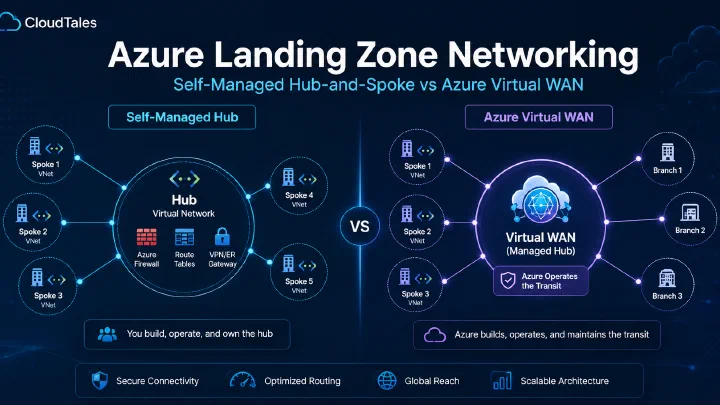
If you have already implemented a hub-and-spoke or Virtual WAN topology, the DNS decisions below sit on top of that foundation.
How Private Endpoint DNS Actually Works
The mechanics matter. Most failures in this space come from misunderstanding what happens at each step, not from hitting a service limit.
The Resolution Path, Step by Step
You create a Private Endpoint for an Azure PaaS service — say, an Azure SQL Database. The service still answers at its public FQDN: contoso.database.windows.net. The Private Endpoint deploys a network interface into your VNet with a private IP.
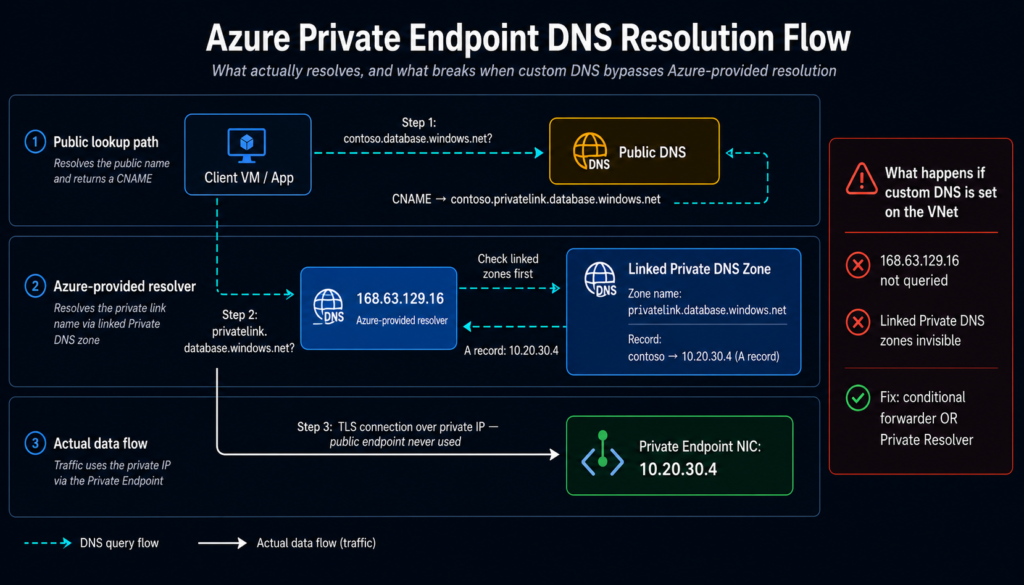
To make clients use the private IP, Azure publishes a CNAME from the public FQDN to a service-specific privatelink subdomain: contoso.privatelink.database.windows.net. That CNAME resolves publicly. Your DNS infrastructure must then answer the next hop differently from the public internet.
That is what a linked Private DNS zone named privatelink.database.windows.net exists for. When a workload in a linked VNet queries the FQDN, the Azure-provided resolver at 168.63.129.16 checks the linked zone first. It finds the A record pointing at the Private Endpoint’s private IP and returns it. This short-circuits the public DNS path.
Three Facts That Drive Every Decision
Everything else in this article follows from three facts that most teams underweight:
The zone name is fixed. Microsoft maintains the canonical list of
privatelink.*zone names per service. If you use a different name, the platform won’t auto-register the A record when the Private Endpoint is created. You then own every record manually for the lifetime of the platform. Don’t.Custom DNS bypasses the zone. The moment you configure a custom DNS server at the VNet level — a Domain Controller VM, a firewall, anything that isn’t
168.63.129.16— Azure skips the Private DNS path entirely. The linked zones stop receiving automatic queries. You must either forward back to168.63.129.16via a conditional forwarder, or use the Azure DNS Private Resolver as the explicit resolver.One VNet, one autoregistration zone. A VNet can be linked to up to 1,000 Private DNS zones for resolution. Only one of those links can have autoregistration enabled. This sounds harmless until a workload needs autoregistration for one zone and resolution for ten others — which is every workload, eventually.
The Architecture Decisions That Actually Matter
The table below condenses the choices that shape every Private DNS design. The rest of the article explains the reasoning. Use this as a quick reference during a design review.
| Decision | Recommended default | When to deviate |
|---|---|---|
| Zone ownership | Centralized in a platform subscription, written via automation, not by application teams | Highly autonomous business units with non-overlapping namespaces |
| Resolver topology | Azure DNS Private Resolver in the hub, used for both Azure-internal and on-premises resolution | VDI or other workloads where the 10,000 QPS endpoint limit binds |
| VNet linking strategy | Link every workload VNet only to the zones it actually needs | Almost never — broad linking is the standard mistake |
| Sharding | Flat zones until the operational pain is real, then shard along ownership boundaries | Multi-tenant platforms, post-M&A integration, per-environment isolation |
| Hybrid resolution | Bidirectional: on-prem → resolver inbound endpoint, Azure → resolver outbound endpoint with a ruleset | Single-direction only when one side hosts no consumers |
| On-prem forwarding scope | Conditional forwarders narrowed to specific privatelink subdomains | Full delegation only when the on-prem domain is entirely Azure-resolved |
Decision 1: Centralized vs Decentralized Zone Ownership
This decision shapes every other one. It is also the one most often made by accident. Microsoft’s Cloud Adoption Framework guidance is unambiguous. In landing zone deployments, Private DNS zones for Private Endpoints belong in a central platform subscription, typically alongside the hub virtual network. The networking team owns them. Application teams should not host their own privatelink zones.
Why Centralization Wins
The reasoning is twofold. First, Private DNS zones are global resources. They don’t belong to a region or workload. When every team creates its own privatelink.blob.core.windows.net, the duplication actively breaks resolution — a VNet can only link to one of them with autoregistration.
Second, the privatelink zone is part of the security boundary. Letting application teams write to it means letting them publish DNS records that override what every other tenant sees. That is not a permissions model anyone defends out loud. It is, however, what decentralized ownership produces in practice.
The Operational Trade-off
The trade-off is real. If the platform team owns the zones, they must operate the record-creation workflow for every Private Endpoint a workload team deploys. The pattern that solves this at scale is well known. Use Azure Policy with the DeployIfNotExists effect. The policy automatically creates the A record in the central zone whenever a Private Endpoint resource is created in any subscription under the management group.
Microsoft publishes this policy as part of the Azure Landing Zones reference accelerator. Do not write it from scratch.
What the policy gives you: the application team owns the Private Endpoint resource, the platform team owns the zone, record creation runs automatically. What the policy does not give you: protection from naming collisions, audit trails of who deployed what, or a way to delete records when the Private Endpoint is gone. Build those yourself, or accept the operational debt as a recurring cost.
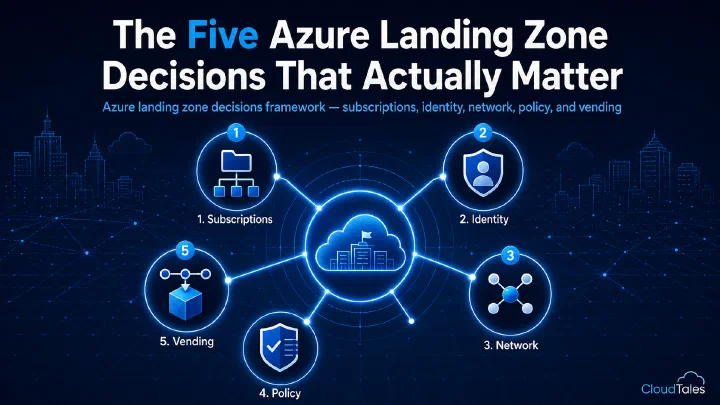
The five-decisions framing of the broader landing zone design treats DNS as a single line item. In practice it is the line item that fails most often, which is why this article unpacks it.
Decision 2: Resolver Topology in the Hub
Once the zones are centralized, the next decision is how on-premises clients and cross-VNet workloads resolve them. Three patterns are in use today. Only one of them is correct as a default in 2026.
Pattern A: Custom DNS VMs in the Hub
Two Windows or Linux VMs running BIND or Windows DNS. Conditional forwarders point to 168.63.129.16 for the privatelink zones and to on-premises servers for corporate domains. This is the pattern most organizations inherited from 2018. It still works.
You must patch this infrastructure, monitor it, and pay for it in availability zones to keep it highly available. There is no longer a reason to build it new.
Pattern B: Azure DNS Private Resolver, Centralized in the Hub
A managed PaaS service. It exposes inbound and outbound endpoints inside your VNet, removes the need to operate DNS VMs, and integrates natively with Private DNS zones in the same subscription.
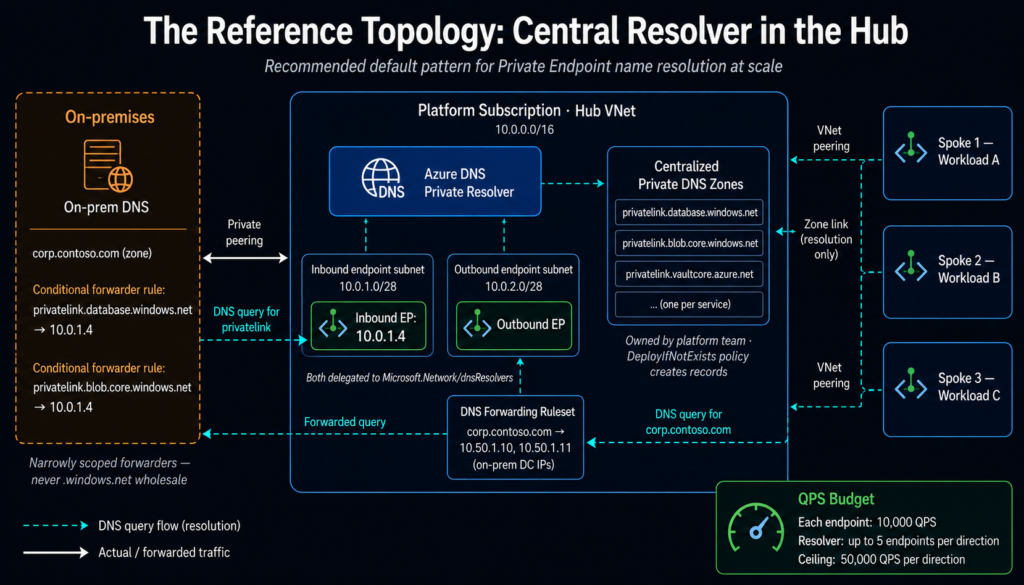
Each inbound and outbound endpoint supports up to 10,000 queries per second. A single resolver can host up to five endpoints of each type. The theoretical ceiling is 50,000 QPS per direction. For nearly every enterprise workload, this is well beyond what’s needed.
The subnet requirements are specific. You need a dedicated /28 or larger, delegated to Microsoft.Network/dnsResolvers, with no other resources in it. These constraints are not onerous. Note three limitations to flag early: cross-tenant Ruleset linking is not supported, the service is not compatible with ExpressRoute FastPath, and it does not work with Azure Lighthouse.
Pattern C: DNS Forwarding Ruleset Linked Directly to Spoke VNets
A less-discussed pattern, designed for high-QPS workloads such as Azure Virtual Desktop. In these cases, the inbound endpoint becomes a bottleneck.
By linking the forwarding ruleset directly to the spoke VNet, queries for on-premises namespaces bypass the inbound endpoint. They go straight to the outbound endpoint. Queries for privatelink zones reach the Azure DNS service directly, without touching the resolver at all. This eliminates the inbound-endpoint QPS constraint for Azure-internal resolution.
Use it when a workload’s DNS load profile justifies it. Don’t use it as a default. It spreads DNS configuration across spoke VNets instead of centralizing it.
The Default
Pattern B. Deviate only when the QPS math forces you to. Document the reason when you do.
Sizing the resolver correctly is its own exercise — use the resolver sizing calculator to validate endpoint count and cost before deploying.
Decision 3: Hybrid DNS — On-Premises and Azure Resolving Each Other
Most enterprise platforms must answer two questions in both directions:
From on-premises, how does a workload resolve
contoso.privatelink.database.windows.netto the private IP in Azure?From Azure, how does a workload resolve
app.corp.contoso.comto a private IP on-premises?
The Bidirectional Pattern
The Azure DNS Private Resolver was designed to solve exactly this. On-premises DNS servers configure a conditional forwarder. It points to the resolver’s inbound endpoint IP for every privatelink zone you publish.
Azure workloads use the resolver’s outbound endpoint. A DNS Forwarding Ruleset conditionally forwards corporate domains to on-premises DNS servers. The two directions configure independently and operate independently. Forwarding rules support up to six target DNS servers per rule. That is enough for any sensible on-premises resilience pattern.
The Three Mistakes That Break Hybrid DNS
The most common mistake here is forwarding too broadly from on-premises. If you configure the on-premises DNS server to forward all *.azure.com or *.windows.net queries to the inbound endpoint, public Azure services break. The Azure portal stops loading. Public Azure DNS stops resolving. Anything not Private-Endpointed fails.
Configure the conditional forwarders narrowly. Only the specific privatelink subdomains you have Private Endpoints in, and nothing more. Treat the Microsoft-published list of privatelink zone names as authoritative. Refresh your reference against it twice a year.
A second mistake assumes the resolver’s inbound endpoint is reachable from on-premises without explicit routing. It is not. The inbound endpoint sits in a hub VNet subnet. On-premises traffic reaches it only over ExpressRoute private peering or VPN. Your network team must publish the route in both directions. Test this end-to-end before the first workload deploys a Private Endpoint that depends on it.
A third, subtler mistake conflates the on-prem corporate zone with the privatelink path. If your corporate domain is corp.contoso.com and you also use contoso.com for public DNS, the forwarding rules must distinguish them precisely. Loose patterns produce loops or NXDOMAIN responses. They look like network issues but are DNS configuration problems wearing a network mask.
Decision 4: Sharding — When Flat Zones Stop Working
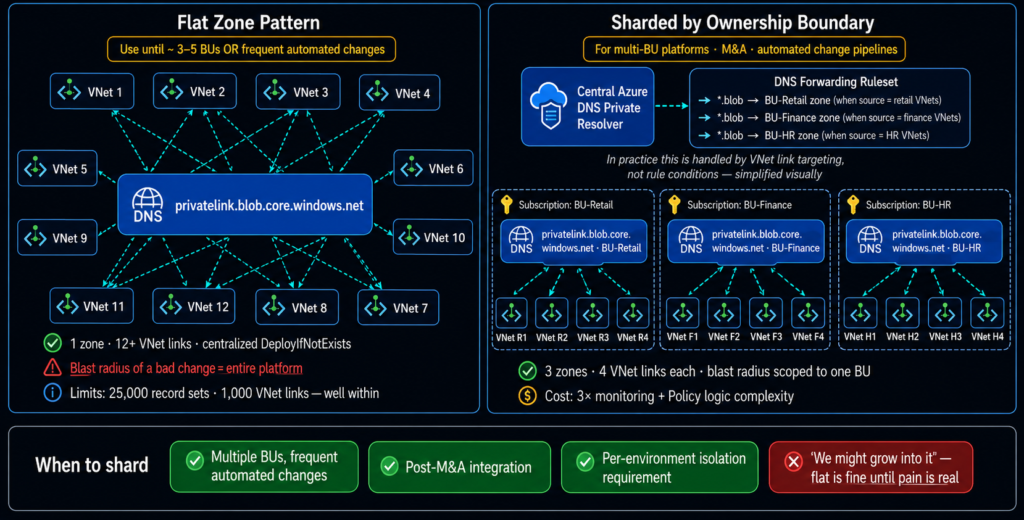
For most platforms, a flat Private DNS zone hosted centrally is the correct pattern indefinitely.
What the Service Limits Actually Allow
Microsoft’s own service limits accommodate substantial scale: 1,000 Private DNS zones per subscription, 25,000 record sets per zone, 20 records per record set, 1,000 virtual network links per zone, and 1,000 zones a single VNet can resolve against. These numbers are well beyond what most enterprises need. Pushing the limits is a far weaker signal of trouble than the operational symptoms below.
What Actually Drives the Sharding Decision
What changes the calculus is not size but ownership. Multiple business units share a single Azure tenant. DNS changes are frequent and automated. The blast radius of a single misconfiguration becomes large.
A bad Bicep deployment that overwrites the wrong A record in privatelink.blob.core.windows.net takes out blob resolution for every workload in the platform until someone reverts it. The fix is not larger zones. It is smaller ownership boundaries.
The Sharding Pattern
Microsoft formalized this in early 2026 as a published sharding pattern. The shape is straightforward. Instead of one central privatelink.blob.core.windows.net zone, deploy one per ownership boundary — per business unit, per environment, per major tenant. Each lives in its own subscription or resource group. Each links only to the VNets that need it.
A central Azure DNS Private Resolver, with forwarding rulesets pointing at the correct zones, keeps the resolution path transparent to workloads. The back-end structure becomes more granular without changing how clients query.
The Costs of Sharding
Sharding has costs. It multiplies the number of zones you must monitor, audit, and document. It also complicates the Policy-driven autoregistration pattern from Decision 1 — the policy must select the correct zone based on the subscription or tag of the Private Endpoint being created.
Don’t shard until the operational pain of a flat zone is real. When it is, shard along the boundary that actually corresponds to ownership. Sharding by some other axis just moves the problem and adds overhead.
Specifically: shard by ownership boundary first, by environment second, never by region. Private DNS zones are global resources. Regional sharding produces no isolation benefit and forces you to maintain duplicate records.
Decision 5: Cross-Tenant, Cross-Region, and the AVNM Question
Three specific scenarios break assumptions in the standard guidance.
Cross-Tenant Resolution
The Azure DNS Private Resolver does not support cross-tenant Ruleset linking. If your platform spans multiple Entra tenants — a common consequence of M&A — you cannot centralize resolution in one tenant and consume it from another via the managed service.
You will need a resolver per tenant. Alternatively, DNS server VMs can explicitly route queries via private IP across the tenant boundary. Plan for this before the first cross-tenant Private Endpoint is requested, not after the request lands in your inbox.
Cross-Region Resolution
Private DNS zones are global resources. A zone created in West Europe is reachable from VNets in East US. This is by design and is the correct behavior.
It also means the zone is not “owned” by a region in any operational sense. Your monitoring should treat it as a tenant-wide dependency. Tag accordingly. Ensure the resource group hosting the zones is itself replicated only at the documentation level, not the resource level.
Azure Virtual Network Manager
AVNM does not manage Private DNS zone links. It manages connectivity and security rules, not DNS. If your platform’s connectivity model is AVNM-driven mesh or hub-and-spoke, you still need a separate process to manage the privatelink zone links per workload VNet. Typically this is Policy-driven or pipeline-driven.
Do not assume AVNM will handle DNS just because it handles peering. That conflation has caused real production incidents in environments where the platform team expected one system to do both.
Operational Failure Modes
The patterns above prevent the architectural failures. The operational failures need a separate list. They happen even when the architecture is correct.
Stale Records After Private Endpoint Deletion
The DeployIfNotExists policy creates A records. It does not delete them. When an application team deletes a Private Endpoint without coordinating with platform, the record stays.
Six months later, the private IP gets reused by a different Private Endpoint. Resolution silently starts pointing the wrong workload’s traffic at someone else’s data plane. The fix is a separate cleanup workflow, or a custom policy that audits orphaned records weekly. Do not rely on humans to notice.
Wrong Privatelink Zone Name
Microsoft maintains the canonical list of privatelink.* names per service. That list occasionally changes as services evolve or new SKUs ship. The most common version of this mistake uses the regional variant where the global one is required, or vice versa — Storage Account variants are the usual culprit.
Treat the Microsoft Learn list of privatelink zone names as authoritative. Re-validate your reference implementation against it twice a year.
Custom DNS at the VNet Without Forwarding
A workload team configures a custom DNS server at the VNet level. The reason varies — to talk to a domain controller, to use a security tool, anything. Private DNS resolution silently stops working for that VNet.
The Private Endpoint still works at the network layer. The DNS just resolves the public IP. Catch this with a policy that audits VNets with custom DNS servers configured outside an approved list. Alternatively, use synthetic monitoring that verifies private resolution from each workload subnet on a schedule.
Conditional Forwarder TTL Drift
On-premises DNS forwarders cache responses from the inbound endpoint with a TTL. If the TTL is high, a Private Endpoint IP change produces stale resolution that can last for hours. IP changes are uncommon, but they happen during regional failover or a delete-and-recreate operation.
Keep TTLs in the privatelink zones low. The default of 10 seconds is fine. Resist requests to raise it for performance reasons that don’t actually exist in any modern resolver.
QPS Hot Spots from VDI or AKS
Two workloads consistently break the inbound endpoint QPS limit at scale. Azure Virtual Desktop with thousands of concurrent users is one. AKS clusters running CoreDNS configured to forward everything upstream is the other. Both can saturate a 10,000 QPS endpoint quickly.
The fix is the Ruleset-linking pattern from Decision 2. In AKS specifically, you can also configure CoreDNS to cache aggressively for Azure-internal names. Don’t just add more endpoints without measuring. Understand the load profile first.
DNS Security Policy Not Configured
Azure DNS Security Policy, generally available since 2025, lets you allow, alert, or block DNS queries based on domain lists. This includes Microsoft’s managed Threat Intelligence feed.
If your platform has the Private Resolver but no security policy applied, you are missing a free layer of malicious-domain blocking. It operates at the resolver itself, with no agent on workloads required. The policy:VNet relationship is 1:N. A single policy applies to all VNets in the same region. There is no good reason not to enable this.
Validating That the Design Works
A Private DNS design is correct when, and only when, you can demonstrate the following from every relevant context. Treat these as the acceptance tests of the platform, not a one-time verification at go-live.
From a workload subnet in Azure,
nslookup contoso.database.windows.netreturns a private IP in your address space. It does not return the public IP.From an on-premises workstation that should reach the same database, the same query returns the same private IP.
From a public network — your phone hotspot, an external host — the same query returns the public IP. That is what unprivileged resolution should do. If you get a private IP from the public internet, your zone is leaking and you need to find out how.
Stop the Azure DNS Private Resolver’s inbound endpoint. On-premises resolution fails immediately and noisily. Alerting fires within minutes. If alerting does not fire, your monitoring is the problem, not the resolver.
Deploy a new Private Endpoint in any workload subscription via the standard pipeline. An A record appears in the central privatelink zone within a few minutes — automatically, with no human action. If a ticket has to be opened, the platform is not done.
If all five hold, the design operates as intended. If any of them fails, that gap is the first thing to fix. None of the architectural decisions above protect against operational drift that the validation tests don’t catch.
Closing
Private DNS is the part of the Azure landing zone that pays for sloppy design later, not sooner. The cost of getting it right is a few hours of decision-making. The platform team then owns a centralized pattern end-to-end.
The cost of getting it wrong is a recurring tax on every Private Endpoint deployment for the platform’s entire lifetime. You pay it in tickets, in resolution failures, and in security reviews that find what nobody wanted to find.
They are the patterns Microsoft has documented incrementally since 2020. The resolver and sharding guidance closed the remaining gaps in 2024 and 2026. What is rare is treating them as the single design they actually are, rather than discovering them one painful incident at a time.

Comments
Comments are stored in GitHub Discussions. Sign in with GitHub to comment or react.