
Every CloudTales recipe gives its commands twice, in PowerShell and in Bash, and deploys with Bicep. This one installs the four tools on Windows or Ubuntu, signs you in, and runs a check that prints one line per tool: OK or NO.
Why
Azure has two command lines, and both are worth having. The Azure CLI (az) is the same on every OS and is what most documentation uses. Az PowerShell returns objects instead of text, which makes it the better tool for anything you will pipe, filter or schedule. Bicep describes what should exist, so a recipe deployed twice gives the same result twice.
The one trap: Az PowerShell does not bring its own Bicep. It looks for bicep on your PATH, while az keeps a private copy in your home folder. That is why Bicep is installed twice below, and why the check tests both.
Before you start
- Windows 10/11, Windows Server 2025, or Ubuntu 24.04 (WSL works).
- An Azure subscription you can sign in to. Reader is enough here.
- The scripts are in cloudtales-gr/azure-recipes:
install-windows.ps1,install-ubuntu.shand the twoverifyscripts. Or type the commands below.
Steps
Install the tools
Windows
winget installs PowerShell 7, the Azure CLI and Bicep. Already-installed packages are upgraded if a newer version exists, so the same commands also update an existing machine.
winget install --exact --id Microsoft.PowerShell --source winget
winget install --exact --id Microsoft.AzureCLI  --source winget
winget install --exact --id Microsoft.Bicep     --source winget
Found an existing package already installed. Trying to upgrade the installed package...
No available upgrade found.

Found Microsoft Azure CLI [Microsoft.AzureCLI] Version 2.91.0
Downloading https://azcliprod.blob.core.windows.net/msi/azure-cli-2.91.0-x64.msi
Successfully verified installer hash
Starting package install...
Successfully installed

Found Bicep CLI [Microsoft.Bicep] Version 0.48.1
Downloading https://github.com/Azure/bicep/releases/download/v0.48.1/bicep-setup-win-x64.exe
Successfully verified installer hash
Starting package install...
Successfully installed
Now close every terminal window, open a new one, start pwsh and install the Az module for your user. It is about 80 modules, so give it 5 to 10 minutes.
Install-PSResource -Name Az -Repository PSGallery -Scope CurrentUser -TrustRepository
Ubuntu
On Windows, run this inside the distribution (wsl -d Ubuntu-24.04), as your normal user, not from PowerShell. The Azure CLI and PowerShell come from Microsoft’s apt repositories; Bicep goes to /usr/local/bin so PowerShell finds it too.
curl -sL https://aka.ms/InstallAzureCLIDeb | sudo bash

source /etc/os-release
wget -q "https://packages.microsoft.com/config/ubuntu/${VERSION_ID}/packages-microsoft-prod.deb"
sudo dpkg -i packages-microsoft-prod.deb && rm packages-microsoft-prod.deb
sudo apt-get update && sudo apt-get install -y powershell

curl -sLo bicep https://github.com/Azure/bicep/releases/latest/download/bicep-linux-x64
sudo install -m 0755 bicep /usr/local/bin/bicep && rm bicep
az bicep install

pwsh -Command 'Install-PSResource -Name Az -Repository PSGallery -Scope CurrentUser -TrustRepository'
The following NEW packages will be installed:
  azure-cli
Get:1 https://packages.microsoft.com/repos/azure-cli noble/main amd64 azure-cli amd64 2.91.0-1~noble [57.1 MB]
Setting up azure-cli (2.91.0-1~noble) ...
...
The following NEW packages will be installed:
  powershell
Get:1 https://packages.microsoft.com/ubuntu/24.04/prod noble/main amd64 powershell amd64 7.6.7-1.deb [55.4 MB]
Setting up powershell (7.6.7-1.deb) ...
...
Installing Bicep CLI v0.48.1...
The configuration value of bicep.use_binary_from_path has been set to 'false'.
Successfully installed Bicep CLI to "/home/you/.azure/bin/bicep".
Sign in
Each tool keeps its own sign-in. Do it once in each; after that they remember you. If you have a single subscription it is picked for you; with several, the CLI shows a numbered list.
PowerShell
Connect-AzAccount                    # opens the Windows account picker
# Connect-AzAccount -Tenant <id>     # guest in other tenants? see Troubleshooting
Please select the account you want to login with.

Retrieving subscriptions for the selection...
Bash
az login                    # opens a browser
az login --use-device-code  # WSL or a server without a browser
To sign in, use a web browser to open the page https://login.microsoft.com/device and enter the code XXXXXXXXX to authenticate.

Retrieving tenants and subscriptions for the selection...

[Tenant and subscription selection]

No     Subscription name    Subscription ID                       Tenant
-----  -------------------  ------------------------------------  ---------
[1] *  Cloudtales           xxxxxxxx-xxxx-xxxx-xxxx-xxxxxxxxxxxx  xxxxxxxxx

Select a subscription and tenant (Type a number or Enter for no changes):
Run the check
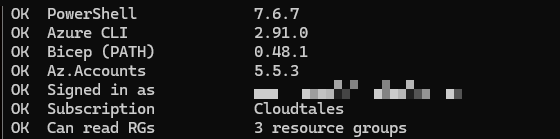
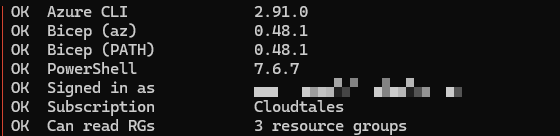
verify.ps1 and verify.sh from the repo print one line per tool, then read your resource groups to prove the sign-in works.
PowerShell
pwsh ./verify.ps1
OK  PowerShell             7.6.7
OK  Azure CLI              2.91.0
OK  Bicep (PATH)           0.48.1
OK  Az.Accounts            5.5.3
OK  Signed in as           you@example.com
OK  Subscription           Cloudtales
OK  Can read RGs           3 resource groups
Bash
bash verify.sh
OK  Azure CLI              2.91.0
OK  Bicep (az)             0.48.1
OK  Bicep (PATH)           0.48.1
OK  PowerShell             7.6.7
OK  Signed in as           you@example.com
OK  Subscription           Cloudtales
OK  Can read RGs           3 resource groups
Verify
Every line of the check starts with OK. Any NO names the tool that is missing, and the next section has the fix for each one we hit in the lab.
Clean up
Nothing to clean up in Azure. To remove the tools: winget uninstall --id <package> on Windows, sudo apt-get remove azure-cli powershell on Ubuntu. A WSL distribution made just for the lab goes with wsl --unregister <name>.
Troubleshooting
Bicep (PATH)saysNOon Windows, although winget installed it. Windows Terminal hands every new tab the environment it had when it started, so a new tab does not see the PATH that winget just changed. Close every Windows Terminal window and open a new one.- The scripts will not run: “cannot be loaded… not digitally signed”. Files from a downloaded zip carry the “from the internet” mark. Clear it once with
Get-ChildItem -Recurse <folder> | Unblock-File. - “Authentication failed against tenant … multi-factor authentication” during sign-in. You are also a guest in another tenant whose Conditional Access needs MFA. Your own subscription is unaffected; sign in to your tenant only with
Connect-AzAccount -Tenant <id>oraz login --tenant <id>. Bicep (az)saysNOon Ubuntu.az bicep installputs Bicep in the home folder of whoever ran it. If the install ran as root (for examplebash install-ubuntu.shstarted from PowerShell before WSL had a user), runaz bicep installagain as yourself.- The Az module install looks stuck. It is about 80 modules and prints little; 5 to 10 minutes is normal.
debconf: unable to initialize frontend: Dialogon Ubuntu. Harmless: apt is running without an interactive screen and falls back to plain prompts.
Going further
The next recipe, GOV-01, secures a new tenant before anything else is built in it. If you want to know why every recipe on this site avoids keys and secrets, start with Zero-Key Architecture on Azure.
Comments
Comments are stored in GitHub Discussions. Sign in with GitHub to comment or react.