
Six people from a CSV, a security group for each department, an “All staff” group that nests the department groups, a group owner who is not an admin, the questions you get asked every week, and a leaver done properly. All of it with Microsoft Graph PowerShell, the module that replaced the retired AzureAD and MSOnline modules.
Why
The portal is fine for one user. For six, for a CSV from HR, or for the same change every Monday, you want a script that you can run again and that only adds what is missing. Groups matter more than users: access to apps, roles, Azure resources and licences should go to groups, so that a new starter gets everything by joining one group, and a leaver loses everything by leaving it.
Two habits from this recipe pay off later. Department groups nested in an All-staff group mean you maintain membership in one place. A non-admin group owner lets the IT lead manage the IT group without any directory role.
Before you start
- The tenant from GOV-01, or any test tenant. You need User Administrator and Groups Administrator, or Global Administrator in a lab.
- PowerShell 7 from GOV-02. The scripts install the Microsoft Graph modules they need.
- The scripts are in cloudtales-gr/azure-recipes:
deploy.ps1,queries.ps1,leaver.ps1,verify.ps1,cleanup.ps1andusers.csv. Microsoft Graph has no Azure CLI equivalent worth using here, so this recipe is PowerShell only; on Linux run it withpwsh.
Steps
Create users from a CSV
The CSV is what HR would send: names, a nickname for the sign-in name, department and job title.
GivenName,Surname,Nickname,Department,JobTitle
Anna,Papadaki,anna.papadaki,Finance,Finance Manager
Nikos,Georgiou,nikos.georgiou,Finance,Accountant
Eleni,Markou,eleni.markou,IT,IT Lead
Kostas,Dimou,kostas.dimou,IT,Systems Engineer
Maria,Lykou,maria.lykou,Sales,Sales Manager
Giorgos,Pappas,giorgos.pappas,Sales,Account Executive
For each row the script checks whether the user exists, and creates it only if not. Every user gets a random temporary password that must be changed at first sign-in, and a usage location, which licences need later.
New-MgUser -GivenName $row.GivenName -Surname $row.Surname -DisplayName "$($row.GivenName) $($row.Surname)" `
    -UserPrincipalName "$($row.Nickname)@$domain" -MailNickname $row.Nickname `
    -Department $row.Department -JobTitle $row.JobTitle -UsageLocation 'GR' -AccountEnabled `
    -PasswordProfile @{ Password = $pw; ForceChangePasswordNextSignIn = $true }
Build the groups
One security group per department, filled from the users’ Department, and an sg-all-staff group whose members are the three department groups, not the six users.
New-MgGroup -DisplayName 'sg-finance' -MailNickname 'sg-finance' -MailEnabled:$false -SecurityEnabled
New-MgGroupMember -GroupId $finance.Id -DirectoryObjectId $anna.Id      # a user
New-MgGroupMember -GroupId $allStaff.Id -DirectoryObjectId $finance.Id  # a group inside a group
The IT lead becomes the owner of sg-it. Owners can add and remove members of their group without holding any admin role.
New-MgGroupOwnerByRef -GroupId $it.Id -BodyParameter @{ '@odata.id' = "https://graph.microsoft.com/v1.0/users/$($eleni.Id)" }
Run it:
pwsh ./deploy.ps1 -TenantId cloudtaleslab.onmicrosoft.com
Tenant: cloudtaleslab.onmicrosoft.com
user  anna.papadaki@cloudtaleslab.onmicrosoft.com
user  nikos.georgiou@cloudtaleslab.onmicrosoft.com
user  eleni.markou@cloudtaleslab.onmicrosoft.com
user  kostas.dimou@cloudtaleslab.onmicrosoft.com
user  maria.lykou@cloudtaleslab.onmicrosoft.com
user  giorgos.pappas@cloudtaleslab.onmicrosoft.com
group sg-finance
group sg-it
group sg-sales
group sg-all-staff
owner eleni.markou@cloudtaleslab.onmicrosoft.com of sg-it

Temporary passwords (must be changed at first sign-in, and MFA registration follows):

User                                         TemporaryPassword
----                                         -----------------
anna.papadaki@cloudtaleslab.onmicrosoft.com  ********************
...
In the portal, sg-all-staff has three direct members, and All members shows what they add up to: six users through three groups.
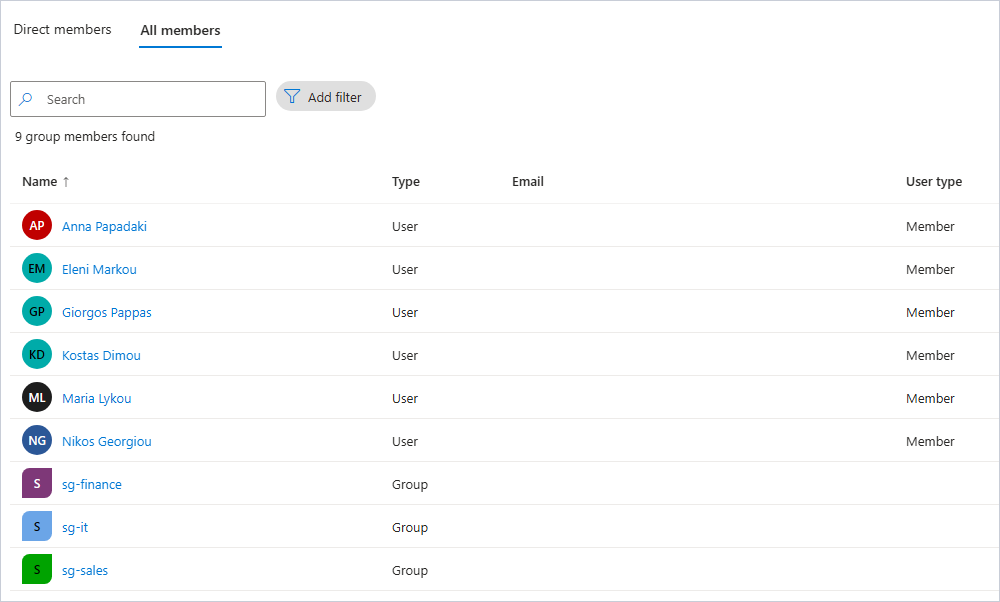
Nesting has limits. Group-based licensing, for example, ignores nested groups, so assign licences to the department groups, not to sg-all-staff.
Answer the everyday questions
queries.ps1 asks what you will be asked: who is in Finance, find someone by name, who is really in All staff, and who is in which group.
pwsh ./queries.ps1 -TenantId cloudtaleslab.onmicrosoft.com
--- 1. Who works in Finance? (a simple filter)

DisplayName    JobTitle
-----------    --------
Anna Papadaki  Finance Manager
Nikos Georgiou Accountant

--- 2. The same with an advanced query (ConsistencyLevel eventual + count)

DisplayName    JobTitle
-----------    --------
Anna Papadaki  Finance Manager
Nikos Georgiou Accountant

count: 2
--- 3. Search by name, without and with ConsistencyLevel
Get-MgUser_List: Request with $search query parameter only works through MSGraph with a special request
header: 'ConsistencyLevel: eventual'  Status: 400 (BadRequest) ErrorCode: Request_UnsupportedQuery

DisplayName   UserPrincipalName
-----------   -----------------
Anna Papadaki anna.papadaki@cloudtaleslab.onmicrosoft.com

--- 4. Direct vs transitive members of sg-all-staff
direct:     sg-finance, sg-it, sg-sales
transitive: 6 users
Two things worth knowing from that output:
- A filter on
departmentworks without any special header today. Older guides say otherwise; you only need-ConsistencyLevel eventualfor the advanced cases, such as-CountVariable,endsWith, or sorting. -Searchalways needs it. Without-ConsistencyLevel eventualGraph refuses the request withRequest_UnsupportedQuery. With it,displayName:annfinds Anna.
The last part writes every user with all their groups, nested ones included, to users-and-groups.csv:
--- 5. Every user and the groups they belong to, to CSV

User                                         Department Enabled Groups
----                                         ---------- ------- ------
admin@cloudtaleslab.onmicrosoft.com                        True Global Administrator
anna.papadaki@cloudtaleslab.onmicrosoft.com  Finance       True sg-finance; sg-all-staff
breakglass01@cloudtaleslab.onmicrosoft.com                 True EmergencyAccess; Global Administrator
breakglass02@cloudtaleslab.onmicrosoft.com                 True EmergencyAccess; Global Administrator
eleni.markou@cloudtaleslab.onmicrosoft.com   IT            True sg-it; sg-all-staff
giorgos.pappas@cloudtaleslab.onmicrosoft.com Sales         True sg-all-staff; sg-sales
kostas.dimou@cloudtaleslab.onmicrosoft.com   IT            True sg-it; sg-all-staff
maria.lykou@cloudtaleslab.onmicrosoft.com    Sales         True sg-all-staff; sg-sales
nikos.georgiou@cloudtaleslab.onmicrosoft.com Finance       True sg-finance; sg-all-staff

saved users-and-groups.csv
Get-MgUserTransitiveMemberOf returns directory roles as well as groups, which is why the break-glass accounts and the tenant’s first administrator show Global Administrator. That makes this report a quick way to spot who holds a role.
Check it
Before anyone leaves, confirm the starting point:
pwsh ./verify.ps1 -TenantId cloudtaleslab.onmicrosoft.com
OK  Users from the CSV             6 of 6
OK  Department and usage location
OK  sg-finance                     2 members
OK  sg-it                          2 members
OK  sg-sales                       2 members
OK  sg-all-staff direct members    3 groups
OK  sg-all-staff transitive users  6 users
OK  sg-it owner                    eleni.markou@cloudtaleslab.onmicrosoft.com
Handle a leaver
Deleting the account is the last step, not the first. In order: stop new sign-ins, end the sessions that are already open, take away the group memberships, and only then delete.
Update-MgUser -UserId $user.Id -AccountEnabled:$false          # no new sign-ins
Revoke-MgUserSignInSession -UserId $user.Id                     # existing sessions must sign in again, and cannot
Remove-MgGroupMemberByRef -GroupId $group.Id -DirectoryObjectId $user.Id
Remove-MgUser -UserId $user.Id                                  # restorable for 30 days
pwsh ./leaver.ps1 -TenantId cloudtaleslab.onmicrosoft.com -Nickname giorgos.pappas -Delete
1. sign-in disabled
2. refresh tokens revoked: every app must sign in again, and cannot
3. removed from sg-sales
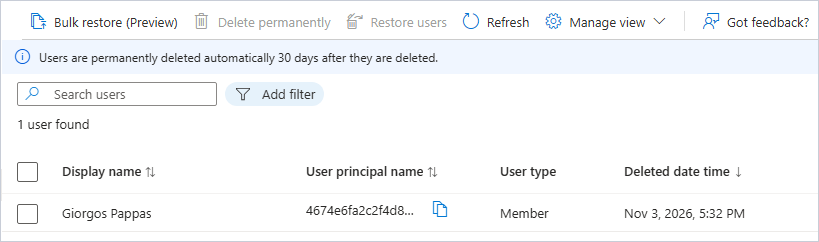
4. deleted: in Deleted users for 30 days, then gone

DisplayName    UserPrincipalName                                                            DeletedDateTime
-----------    -----------------                                                            ---------------
Giorgos Pappas 4674e6fa2c2f4d8b86ce08fd27691de4giorgos.pappas@cloudtaleslab.onmicrosoft.com 3/11/2026 3:32:35 PM
A deleted user’s sign-in name gets the object ID in front of it, so the original name is free for a new account at once. For 30 days you can still bring the old one back with Restore-MgDirectoryDeletedItem -DirectoryObjectId <id>, groups excepted: those were removed in step 3 and need adding again.
Verify
verify.ps1 prints eight OK lines before the leaver step. Run it after the leaver and three lines turn to NO: users 5 of 6, sg-sales 1 member, transitive users 5. That is the leaver, not a fault.
Clean up
pwsh ./cleanup.ps1 -TenantId cloudtaleslab.onmicrosoft.com
It deletes the four groups and the six lab users, then purges the users from Deleted users so they do not wait 30 days. The break-glass accounts and the tenant stay.
Troubleshooting
Request_UnsupportedQuerywith-Searchor-CountVariable. Add-ConsistencyLevel eventual. These are advanced queries and Graph refuses them without that header.- A user you just created is missing from a list query. The directory is eventually consistent: a lookup by ID finds the user at once, but
Get-MgUser -Allmay take a few seconds. The script waits 15 seconds after creating users before it fills the groups. - “WARNING: The version ‘2.41.2’ of module ‘Microsoft.Graph.Authentication’ is currently in use”. Another PowerShell window has the module loaded, so it cannot be updated now. Harmless; close the other windows and run the script again to update.
- The leaver can still read mail or files for a while. Revoking sessions invalidates refresh tokens, but an access token already issued stays valid until it expires, usually within an hour. Apps that support Continuous Access Evaluation react sooner.
Going further
ID-02 replaces the hand-filled department groups with dynamic groups that follow the Department attribute by themselves, which needs Microsoft Entra ID P1. ID-12 turns group membership into an access package that people request and that expires on its own.
Comments
Comments are stored in GitHub Discussions. Sign in with GitHub to comment or react.