There is an audio player at the top of this post. Press play, and an Azure neural voice reads the article to you.
The pipeline behind that player touches Azure Functions, Azure AI Speech, Blob and Queue Storage, and Application Insights. Every one of those services ships with keys: static secrets that grant full access to whoever holds them. In this architecture, none of those keys work. Not “we don’t use them”. They are switched off at the resource level, so a leaked key, a pasted connection string or an old .env file in a forgotten repo is worth exactly nothing.
This post walks through how each connection authenticates instead, what the approach cost me in practice, and how to prove it on your own resources. The full code and Bicep are on GitHub: cloudtales-gr/cloudtales-narrator.
Unused keys are not disabled keys
Most “passwordless” guides stop halfway. They add a managed identity, grant a role and delete the connection string from configuration. The code no longer uses a key. The resource still has two of them.
A key does not need your code to be dangerous. Anyone with Contributor rights can list it. It ends up in deployment outputs, pipeline logs and a colleague’s notebook, and it never expires on its own. Until you turn key-based access off, the identity path is just one of two doors.
So the rule for this project was simple: for every service, find the switch that disables key-based access, set it in Bicep, and leave Microsoft Entra ID as the only way in.
| Service | Key-based access that exists by default | The switch that removes it |
|---|---|---|
| Azure AI Speech | Two resource keys | disableLocalAuth: true |
| Storage accounts (audio and Function host) | Two account keys, plus every SAS signed with them | allowSharedKeyAccess: false |
| Azure Functions runtime | AzureWebJobsStorage connection string with an account key | Identity-based connection: AzureWebJobsStorage__accountName |
| Application Insights | Ingestion with the instrumentation key alone | DisableLocalAuth: true |
| Public playback | Anonymous blob access or an account-key SAS | allowBlobPublicAccess: false + user delegation SAS |
The architecture
Three functions in one Flex Consumption app do all the work. All three authenticate with the app’s system-assigned managed identity, and nothing else.
EnqueueChangedArticles runs daily at 04:00 UTC. It reads published posts from the WordPress REST API, builds the SSML for each one and compares its SHA-256 hash with the hash stored on the existing MP3. Only new or changed posts are queued, at most three a day.
NarrateArticle takes one message from the queue, synthesizes that single post with Azure AI Speech and uploads the MP3 with the new hash as blob metadata.
GetAudio is the only way to play a file. It checks that the request comes from a page on the blog and redirects the browser to a link that expires in two hours.
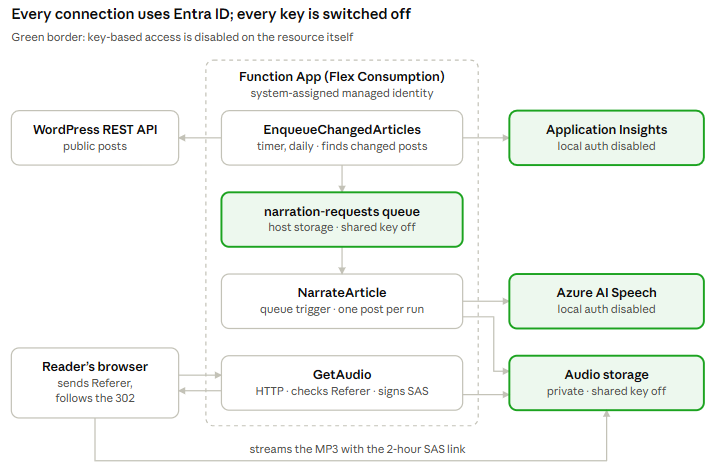
Every arrow is an Entra ID call; the four green resources reject key-based access outright.
1. Function to Speech: a token instead of a key
Every Speech quickstart starts with SpeechConfig.FromSubscription(key, region). That is exactly the line this project does not have.
Entra ID authentication for Speech has one prerequisite that catches people out: the resource needs a custom subdomain. Without it, Entra auth does not work, however correct your role assignments are. The identity also needs the Cognitive Services Speech User role on the resource (Microsoft Learn).
resource speech 'Microsoft.CognitiveServices/accounts@2024-10-01' = {
  name: speechAccountName
  location: location
  kind: 'SpeechServices'
  sku: { name: speechSku }
  properties: {
    customSubDomainName: speechAccountName // required for Entra ID token auth
    disableLocalAuth: true                 // the resource's keys stop working
  }
}
The SDK side is less obvious than it should be. The Speech SDK does not take a TokenCredential; it takes an authorization string in a specific format: aad# + the resource ID + # + the Entra access token.
var token = await credential.GetTokenAsync(
    new TokenRequestContext(["https://cognitiveservices.azure.com/.default"]), ct);

var config = SpeechConfig.FromAuthorizationToken($"aad#{resourceId}#{token.Token}", region);
The token is requested once per article, not once per process. Credentials cache tokens, and a batch that runs longer than a token’s lifetime would otherwise fail halfway through.
2. Storage: no account keys, not even for the Functions runtime
The audio storage account is the easy half. The Function’s identity gets Storage Blob Data Contributor, the code uses BlobServiceClient(endpoint, credential), and allowSharedKeyAccess: false makes the account keys useless (Microsoft Learn).
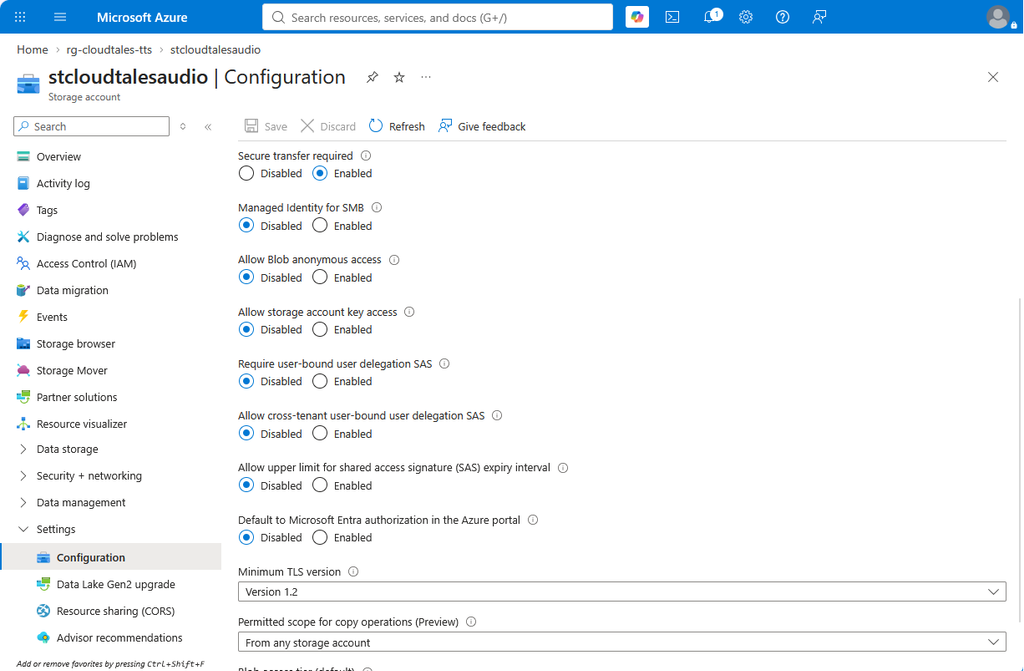
Key access, anonymous access and portal authorization: all on Entra ID.
The harder half is the storage account the Functions runtime itself needs. Historically that meant an AzureWebJobsStorage connection string with an account key in it: the most copied secret in every Functions project. Flex Consumption adds a second dependency, the blob container that holds the deployment package.
Both can run on the managed identity (Microsoft Learn). The connection string becomes a setting that holds only the account name:
functionAppConfig: {
  deployment: {
    storage: {
      type: 'blobContainer'
      value: '${hostStorage.properties.primaryEndpoints.blob}app-package'
      authentication: { type: 'SystemAssignedIdentity' }
    }
  }
  runtime: { name: 'dotnet-isolated', version: '10.0' }
}
siteConfig: {
  appSettings: [
    { name: 'AzureWebJobsStorage__accountName', value: hostStorage.name }
  ]
}
The identity then needs Storage Blob Data Owner on the host account for the runtime’s leases and state, and Storage Queue Data Contributor for the narration queue. With those two roles in place, the host account also runs with allowSharedKeyAccess: false.
3. Telemetry: only authenticated data gets in
The Application Insights connection string is not a secret in the usual sense, and that is exactly the problem. It sits in configuration files and browser code, and with local authentication on, anyone holding the instrumentation key can write telemetry into your resource. Fake exceptions and noise in the one place you go to understand an incident is a real attack surface.
Turning ingestion over to Entra ID takes three settings (Microsoft Learn):
DisableLocalAuth: trueon the Application Insights component.The Monitoring Metrics Publisher role for the Function’s identity. Despite the name, it publishes all telemetry, not only metrics.
The app setting
APPLICATIONINSIGHTS_AUTHENTICATION_STRING = Authorization=AAD, which tells the Functions host to authenticate when it sends.
One limit worth knowing before you copy this: browser-side telemetry from the JavaScript SDK cannot authenticate this way. This pipeline has none, so the switch costs nothing here.
4. Playback: a signed link with no account key behind it
This is the part I find most interesting, because it looks impossible at first. The MP3s must be playable by any anonymous reader. The container is private, and the account keys that normally sign a SAS no longer work. So what signs the link?
A user delegation key. The Function’s identity asks Blob Storage for a key over Entra ID, and Storage returns one that can sign SAS tokens for up to seven days (Microsoft Learn). The SAS is only as strong as the identity that requested the key, and it can never grant more than that identity holds.
The player on each post points at the Function, never at storage:
The browser requests
/api/audio/<slug>, sending the blog page asReferer.GetAudiochecks the host against an allow list, then confirms the MP3 exists.It signs a read-only, HTTPS-only SAS for that one blob, valid for two hours, and answers with a 302 redirect.
The browser streams the file straight from Blob Storage, using range requests as the reader seeks.
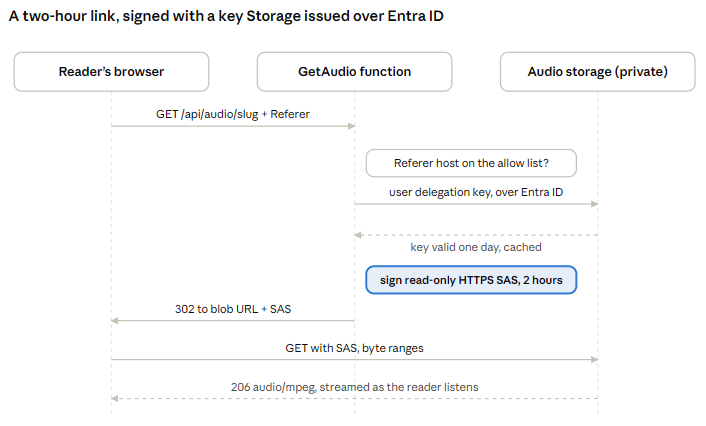
No account key appears anywhere in the flow: the signing key comes from Storage itself, requested with the Function’s Entra token.
var sas = new BlobSasBuilder
{
    BlobContainerName = _container.Name,
    BlobName = blob.Name,
    Resource = "b",
    StartsOn = now.AddMinutes(-5),          // tolerate clock skew
    ExpiresOn = now.Add(TimeSpan.FromHours(2)),
    Protocol = SasProtocol.Https
};
sas.SetPermissions(BlobSasPermissions.Read);

var key = await GetDelegationKeyAsync(ct);  // cached; refreshed daily, not per request
var link = new BlobUriBuilder(blob.Uri) { Sas = sas.ToSasQueryParameters(key, accountName) }.ToUri();
Two hours is long enough to finish a 15-minute article with pauses, and short enough that a copied link dies the same afternoon. If something does go wrong, az storage account revoke-delegation-keys invalidates every link signed so far in one command.
Be clear about what the Referer check is. It stops other sites from hotlinking the audio and removes permanent public URLs. It is not DRM: anyone listening can save the file, and a script can forge the header. For a public blog that is the right trade-off.
5. The developer: no keys on the laptop either
Zero-key ends at the developer’s machine more often than in production. Someone needs to test locally, and the fastest way is a key in appsettings.Development.json that later travels into a commit.
Here the CLI runs on the developer’s own az login. Bicep grants that user the same two data roles as the Function, through an optional developerPrincipalId parameter, and the only local configuration is two resource identifiers in user secrets. Neither is a credential.
The credential is chosen explicitly, not discovered:
public static TokenCredential Create() =>
    string.Equals(Environment.GetEnvironmentVariable("NARRATOR_USE_MANAGED_IDENTITY"), "true",
                  StringComparison.OrdinalIgnoreCase)
        ? new ManagedIdentityCredential(ManagedIdentityId.SystemAssigned)
        : new AzureCliCredential();
I started with DefaultAzureCredential, like everyone. It broke on a corporate laptop: the chain tried managed identity first, the IMDS probe timed out behind the proxy, and the error surfaced as a hard failure instead of moving on to the CLI. Microsoft’s own guidance is to use a deterministic credential in production for the mirror-image reason: a chain can silently pick a different identity than the one you designed for (Microsoft Learn). The Function sets the environment variable in Bicep; nothing else ever does.
What zero-key actually costs
None of this is free, and most articles on the topic skip this part. Every row below cost me real time while building the pipeline.
| Friction | What happens | What to do |
|---|---|---|
| Role propagation | A fresh role assignment takes minutes to apply. The first calls fail with 401 or 403 and look like a configuration error. | Wait and retry before you debug. Deploy roles in the same Bicep as the resources, so the delay happens once. |
| Speech custom subdomain | Entra auth needs it, and the name is set once. | Decide the name in Bicep on day one, not in the portal later. |
| SDK shapes differ | Storage takes a TokenCredential; Speech wants an aad# string. TokenCredential.GetTokenAsync has no default for its CancellationToken, unlike DefaultAzureCredential. | Wrap each service in a small class that owns its auth, so the quirk lives in one place. |
| Tools assume keys | With shared key access off, az storage commands need --auth-mode login, and the portal’s storage browser must be switched to Entra. | Grant your own user data roles; never re-enable keys “just to check something”. |
| Cloud Shell limits | Its managed identity cannot get a token for the Application Insights query API. | Run log queries from a local az login or the portal’s Logs blade. |
| CLI defects | In Azure CLI 2.90, az storage container-rm update --public-access off silently left the container at Blob. | Verify every change you make. When the CLI fails, PATCH the resource with az rest. |
The pattern behind every row: zero-key moves the failure from “a secret leaked” to “access was denied”. The second is loud, immediate and safe. I will take that trade every time.
Prove it on your own resources
A zero-key claim is only as good as a test that tries a key and fails. These four checks take a minute: three try a way in that must fail, and the fourth reads the switch.
The first time I ran these, the Speech check failed in the worst way: it returned two working keys and a playable MP3. The Bicep had the switch, but the deployment that carried it had never run. Nothing in the portal, the code or the README showed it. Only the test did.
Speech: try the keys.
az cognitiveservices account keys list -n <speech-account> -g <resource-group>
(BadRequest) Failed to list key. disableLocalAuth is set to be true
Storage: try shared key authorization.
az storage blob list --account-name <audio-account> -c audio --auth-mode key -o table
Key based authentication is not permitted on this storage account. ErrorCode: KeyBasedAuthenticationNotPermitted
Storage: try anonymous access to an MP3.
curl -sI https://<audio-account>.blob.core.windows.net/audio/<post-slug>.mp3 | head -1
HTTP/1.1 409 Public access is not permitted on this storage account.
Application Insights: confirm local auth is off.
az resource show -g <resource-group> -n <appi-name> \
  --resource-type Microsoft.Insights/components --query properties.DisableLocalAuth
true
Then make it stick. A Bicep template protects the resources it deploys; it does nothing for the next storage account someone creates by hand. Assign the built-in policies Storage accounts should prevent shared key access and Application Insights components should block non-Azure Active Directory based ingestion, plus the equivalent one for Azure AI services local authentication, with the Deny effect at the right management group. Then zero-key is a property of the platform, not of one project.
The rest of the build, briefly
Three design decisions are not about identity but kept the pipeline cheap and observable. Each is in the repo and its README.
Queue fan-out instead of one long run. The first version narrated every post in a single timer execution. Flex Consumption drained the instance mid-run; the work finished, but its telemetry was lost. One message per post gives short, retryable executions and a poison queue for the ones that keep failing.
Chunking under the real-time limit. Real-time synthesis returns at most 10 minutes of audio per request on every tier (Microsoft Learn). Posts are split at paragraph boundaries, synthesized in order and concatenated; a transient Speech error retries only the failed chunk, so finished chunks are never billed twice.
Cost guardrails. A post is synthesized once per version, decided by the SSML hash, and at most three posts a day can be queued. A bug cannot turn into a bill.
The code, Bicep and WordPress snippet are MIT-licensed at github.com/cloudtales-gr/cloudtales-narrator.
If a key exists, it will leak
Not today, and maybe not from you. But keys outlive the people who created them, the repos they were pasted into and the pipelines that printed them. Rotation policies and secret scanners manage that risk. Disabling the key removes it.
Every service in this pipeline had a switch for that, and every switch is one line of Bicep. The friction was real, and all of it showed up as loud, immediate access-denied errors during the build. Not one of them was a quiet failure in production.
So here is the test I now apply to every architecture review: for each key the design “doesn’t use”, can you show me that it doesn’t work? If the answer is no, the key is still part of your attack surface.
And if you made it this far by listening rather than reading: the voice you heard was synthesized, stored and delivered to you without a single working key.
Further reading
Microsoft Entra authentication with the Speech SDK: custom subdomain, roles and the
aad#token format.Prevent Shared Key authorization for an Azure Storage account
Connecting to host storage with an identity:
AzureWebJobsStorage__accountNameand the roles it needs.Authentication best practices with the Azure Identity library for .NET: deterministic credentials in production.
cloudtales-gr/cloudtales-narrator: the full source, Bicep and WordPress player.


Comments
Comments are stored in GitHub Discussions. Sign in with GitHub to comment or react.